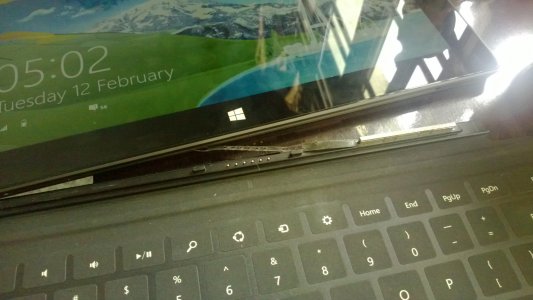
Surface touch cover connectors ripped apart from Surface body (PICS)

When you pull the keyboard from the Surface, make sure you have one hand on the keyboard, and pull straight up on the Surface. I've seen people "peel" the Surface from the keyboard, from one side to the other. That seems to put stress on one side of the magnets, which then causes it to rip out.

 
I hate when I HAVE to do things a certain way for it to not "break" a faulty design. Putting super strong magnets in the cover and supporting them with only the cover material is just poor engineering. Luckily its the only poor engineering on the whole unit it seems.
 
When you pull the keyboard from the Surface, make sure you have one hand on the keyboard, and pull straight up on the Surface. I've seen people "peel" the Surface from the keyboard, from one side to the other. That seems to put stress on one side of the magnets, which then causes it to rip out.

if adhesive tape is really all that's holding the magnets in, peeling or straight pulling is not going to solve the problem of the lack of proper adhesive.
 
I had the same thing happen to my surface last night. I unfortunately was told I cant bring it to the pop up store and have to wait for them to send a new one. luckily it still works.
 
Hi guys, the same thing happened to my surface today :(
WP_20130212_001.jpg

The thing is, since my country does not sell the Surface RT, I imported it from Microsoft store US and shipped it to me using a freight forwarder (I am guessing filing a warranty claim would be very troublesome). Trying to contact the surface support to see what are the possible solutions :(


Edit: I tried adding some adhesive to make sure the magnet does not get ripped out and it's working for now. (Afterall, it's adhesive that's used to keep the magnet in place). Hopefully this will get the job done.
 
Last edited:

Trending Posts

Forum statistics

Threads
343,251
Messages
2,266,332
Members
428,902
Latest member
niedrie