TIP: Change text size for added goodness

Pete

Retired Moderator
Nov 12, 2012
4,593
1
0
In the Display settings, try changing the text size slider to 300%. I found that you get a better look for many of the core apps. It's subtle, but pretty nice (especially the Weather app, where things are no longer cut off at the bottom).

This setting gives me back what I've been missing from my 1520 - more stuff on my screen. Text is smaller of course (for apps that support system font resizing), but it's comfortable for me to read.

I've found that whenever I change the display fond size, I have to re-download a bunch of apps (27 of them), and it's (oddly) not once per font size either.
 
so I've changed mine to 300% too and most of my 3rd party app have ridiculous sized text for example whatsapp.

Are you saying if I redownload the apps they will abide by the system settings and have smaller text?
 
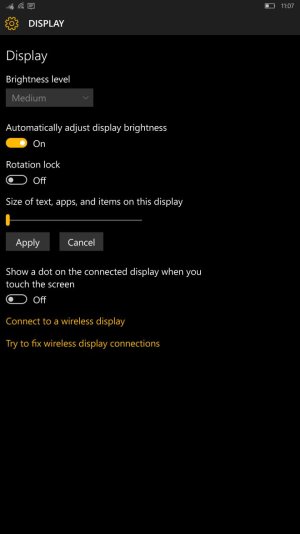
There's also another trick to adjusting text size, where you can keep the smaller layout and have larger text. The "text slider" that you're talking about is not just for text it's for "text, apps, and items". This slider changes the size and layout of pretty much everything.

Settings - System - Display

wp_ss_20151207_0001.jpg

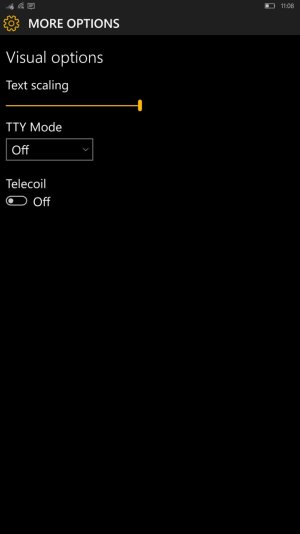
To adjust ONLY the text size, go into:

Settings - Ease of Access - More Options

wp_ss_20151207_0002.jpg


Now, with this combination of two completely different settings, one can adjust only the text size while still retaining their preferred layout and scaling of everything else.
 
I've found that whenever I change the display fond size, I have to re-download a bunch of apps (27 of them), and it's (oddly) not once per font size either.

Are you saying if I redownload the apps they will abide by the system settings and have smaller text?

I'm still scratching my head on this one. I've never ran into an issue where I had to re-download an app to "fix" it's font/text size.
 
Beats me. I guess it's some kind of bug. I'll report it in the feedback app.
 
Beats me. I guess it's some kind of bug. I'll report it in the feedback app.

Can confirm. Just updated my text and ~26 apps re-downloaded. What I saw, was that they were all Windows 10 Universal Apps. And I read that w10 universal apps are the only ones that utilize the text size setting.
 
Yeah, that's how I reported the issue. I'm sticking with the 300% now - the apps that do scale look wonderful like this.
 
Apps are able to adapt to several display sizes because they scale. To scale better the developer can implement several assets with different resolutions, but they are only downloaded the first time you "need" them, for instance after using continuum or changing the scale factor on the phone itself. The additional assets are deleted after 30 days of no use
 
Yes, that's what I understood, but the apps are downloading every time you change the size scale.

So change to 300%, the apps will download
Change to 350%, the apps will download again
Change back to 300%, the apps will download again

etc. Every time you change the size, the Universal Apps will download.
 

Trending Posts

Forum statistics

Threads
342,484
Messages
2,265,566
Members
428,871
Latest member
breadcat