

- Nov 13, 2012
- 15
- 0
- 0
Hi all,
I've been searching around for a solution to this problem and haven't come up with anything yet so I thought I'd ask the trusty Windows Central forums
I'm running build 10041 on this hardware:
MSI Z77A-G45
i7-2700k
Radeon HD6870
Network adapter is Realtek
I'm encountering the following scenario:
After a fresh install, I install two applications that create Virtual network Interfaces:
Cisco Anyconnect Secure Mobility Client (VPN)
VMware Workstation 11
After installing these, they work fine for quite awhile (days). However, after an update and a reboot (I can't pinpoint which update), neither the VPN client nor Workstation 11 work properly. the VPN client will declare it's finished downloading updates, then simply disconnect. Attempts to uninstall the VPN client hang indefinitely, and when trying to run the installer for VMware I get the following screen:
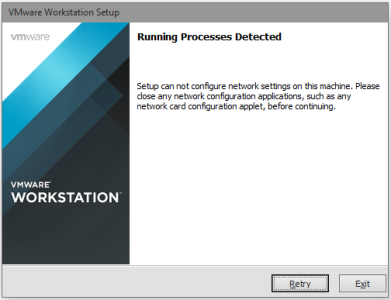
I have no network utilities running and can't really figure out why this is happening. I'm not running any third party anti-virus/malware/spyware.
Also when attempting to modify the Network adapter settings I get this:
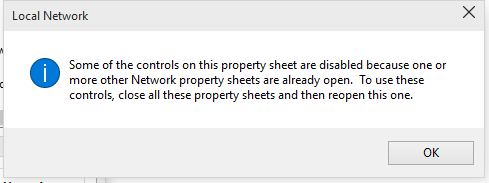
Anyone have any insight? this is an odd issue. I'm going to try ripping out the trouble programs manually and reinstalling but I want to see if anyone else has encountered this before?
I've been searching around for a solution to this problem and haven't come up with anything yet so I thought I'd ask the trusty Windows Central forums
I'm running build 10041 on this hardware:
MSI Z77A-G45
i7-2700k
Radeon HD6870
Network adapter is Realtek
I'm encountering the following scenario:
After a fresh install, I install two applications that create Virtual network Interfaces:
Cisco Anyconnect Secure Mobility Client (VPN)
VMware Workstation 11
After installing these, they work fine for quite awhile (days). However, after an update and a reboot (I can't pinpoint which update), neither the VPN client nor Workstation 11 work properly. the VPN client will declare it's finished downloading updates, then simply disconnect. Attempts to uninstall the VPN client hang indefinitely, and when trying to run the installer for VMware I get the following screen:
I have no network utilities running and can't really figure out why this is happening. I'm not running any third party anti-virus/malware/spyware.
Also when attempting to modify the Network adapter settings I get this:
Anyone have any insight? this is an odd issue. I'm going to try ripping out the trouble programs manually and reinstalling but I want to see if anyone else has encountered this before?



 Facebook
 Twitter
 Instagram