Went from iPhone to Nokia 1520

Golou

New member
Nov 12, 2013
3
0
0
I just went to the Nokia 1520 and dropped my iPhone 5. This is a work phone and I thought I would be different by getting a Windows phone. My problem is that when I am sent a text from people with iPhones I do not get the texts. I know this has to do something with the imessage, I have turned off imessage on my old iPhone, my iPad and iPad mini. I still do not get text messages. Can someone please help me to where I can get text messages again with from iPhone users. I don't want to go back to the iPhone. I love my big oversize banana. :)
 
Has anyone sent you a text message not using imessage? imessage is like Whatsapp but specific to iPhones. Do your friends use Whatsapp?

There's no reason why you shouldn't get text messages that I can think of. Unless it wasn't setup correctly by your provider. Phone type doesn't matter as long as it's an actual text message and not a message app message.
 
Has anyone sent you a text message not using imessage? imessage is like Whatsapp but specific to iPhones. Do your friends use Whatsapp?

There's no reason why you shouldn't get text messages that I can think of. Unless it wasn't setup correctly by your provider. Phone type doesn't matter as long as it's an actual text message and not a message app message.

Actually that's incorrect. Apple servers keep the number on file unless you disabled imessage before removing the SIM. That means texts won't arrive. Stupid yes.

A solution is to go here and remove your phone number/apple id and disable imessage.

https://idmsa.apple.com/IDMSWebAuth...URL=https://supportprofile.apple.com/homePage
 
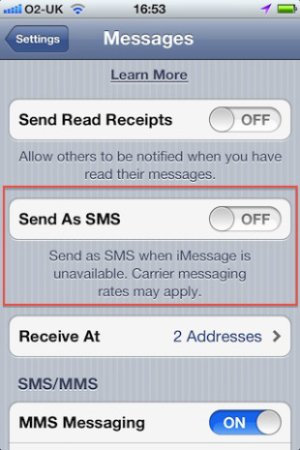
iMessage is a huge pain when you switch from an iOS device. What I've found works best to disable iMessage completely is change your iCloud (iTunes Account) password. This disabled iMessage on all my iOS devices. Just doing this alone should work fine. Also, I have noticed that a lot of my friends with iPhones didn't have the option enabled to "Send as SMS if iMessage is unavailable" (see screenshot below) so I had to tell them to turn that on otherwise I wouldn't get their messages even though iMessage was completely disabled on my end. I hope this helps, and enjoy your 1520, it's a beast!

send-as-sms.jpg
 
Actually that's incorrect. Apple servers keep the number on file unless you disabled imessage before removing the SIM. That means texts won't arrive. Stupid yes.

A solution is to go here and remove your phone number/apple id and disable imessage.

https://idmsa.apple.com/IDMSWebAuth...URL=https://supportprofile.apple.com/homePage


Just a quick note on this, it has worked in the past for me however more recently doing just that for some reason didn't work. That's why I ended up changing my Apple ID (iCloud) password, then iMessage was completely disabled.
 

Trending Posts

Forum statistics

Threads
343,241
Messages
2,266,322
Members
428,900
Latest member
YeOldRam