Why are all of my downloads pending?!?!

TomThumbyThumb

New member
Dec 12, 2013
15
0
0
So I have tried connecting to 3 different wifi networks and restarted my phone countless times, but I can not get my apps to get off of being stuck "pending" infinitely:angry::angry::angry::angry::angry::angry:. Of the searches I have done, I have found 0 helpful solutions.:angry: They all say to restart the device, or connect to a different network, all of which I have done numerous times. Thanks for any replies.
 
Are you trying installing the apps on your SD card? If yes try installing them on your phone memory and see if it works.
 
Does the phone say anything about your Microsoft account needing attention?
 
I have not gotten any notifications saying that it needs attention, no. :asleep: It's so frustrating its been happening for about 5 days now. Is there a way that I can check if it needs attention?
 
I believe the first time I installed the preview I had to re-enter all my account info.
Password for MSFT account and one G-Mail account wouldn't sync after the update.
I was notified about G-Mail, not about the MS account.
I just noted that when fixing the G-Mail account.

Is the Microsoft account accessible from a desktop Machine.
Can you see your OneDrive?
Do the apps show purchased in the store when logged on from a PC?
 
I have a mac book air, but I have tried installing apps from the store on my computer. No luck. And I do have OneDrive installed on my mac, it is visible on both my computer and phone.
 
Any good news here yet?

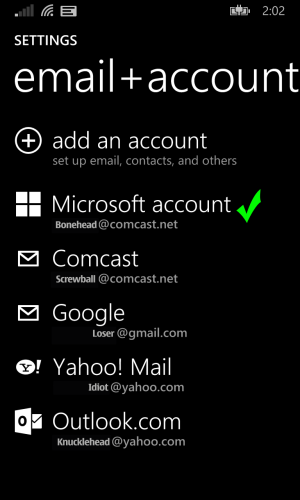
wp_ss_20140515_0001.png

So the Microsoft account is good?
Sometimes it will indicate:
"Needs attention" if the device isn't syncing with a valid account.
 
fisrtly contact with an expert, and start project my screen in ur pc and then connect with team viewer---> problem will solved by and expert only now :wink:
 
wp_ss_20140515_0001.pngYepp mine looks identical. Minus the green checkmark of course. I just tried to access the store and this is what came up.
 
When you log into the store via desktop with your account does it show your devices name?
i.e Windows phone, my phone, or any name you may have chosen...
Is the phone visible on desktop via USB?

Also is find my phone working under your account on desktop?
(Trying to determine if your account is seen by Microsoft)

Edit:
Just thot of something...
This came up in another thread.
Try unplugging your home wi-fi router then plugging it back in.
 
Last edited:
I just checked everything you just mentioned, my account shows my device by name, My phone is visible via USB and Find My Phone is working great! I have also restarted the router many times. One of the first things I tried.
 
Shot in the dark with the router.
Would it be possible to remove the phone from the MSoft account then set up again with a different address...and sign in on a new account to check.

Weird seeing service not available for this long.
 

Forum statistics

Threads
341,938
Messages
2,265,016
Members
428,851
Latest member
Koyoiola