

- Nov 30, 2012
- 171
- 0
- 0
I've tried twice now to manually install the Anniversary Update via the client: https://support.microsoft.com/en-us/help/12387/windows-10-update-history?ocid=update_setting_client . Every time it finishes the download, then starts installing it, only to pop up this message:
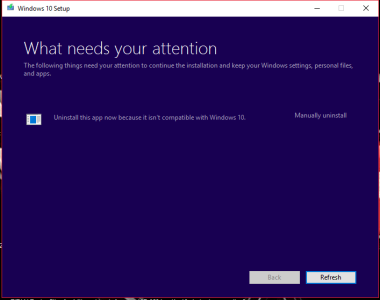
When I click refresh, nothing happens. The app isn't specified and I cant click on Manually uninstall or anything! Anyone else encounter this? How are you supposed to know which app is incompatible if it's not even specified???
When I click refresh, nothing happens. The app isn't specified and I cant click on Manually uninstall or anything! Anyone else encounter this? How are you supposed to know which app is incompatible if it's not even specified???



 Facebook
 Twitter
 Instagram