Background apps missing

Burnbackin

New member
Feb 11, 2013
62
0
0
My 950xl has a terrible battery life. So I went to settings and wanted to disable some apps that may drain the battery in the background. To my surprise, not all are listed (e.g. Beaconit, Freda), and some are double or tripled listed (e.g. Metro tube) and there is no logical sorting order of the apps listed. Is it only on my device or are you experiencing the same? Thanks for the feedback and help.
 
Last edited:
My 950xl has a terrible battery life. So I went to settings and wanted to disable some apps that may drain the battery in the background. To my surprise, not all are listed (e.g. Beaconit, Freda), and some are double or tripled listed (e.g. Metro tube) and there is no logical sorting order of the apps listed. Is it only on my device or are you experiencing the same? Thanks for the feedback and help.
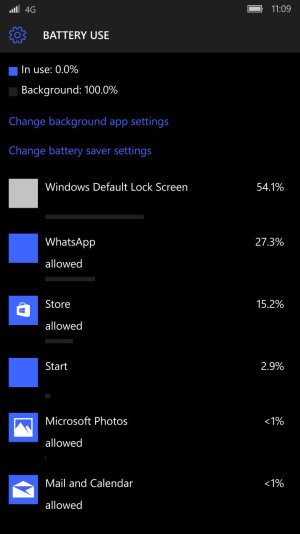
my 950xl doesn't have battery drain problem and each app appears once in the list. i performed an experiment. i left the phone idle for 24 hours and saw which apps consumed most in background. the result is as shown:

wp_ss_20160229_0005.jpg
 
I think the ones that are multi-listed are registering new background processes on updates and the old ones are not being properly cleaned up. I've put a report in on Windows Feedback about it.
Are the ones not in your list actually using background tasks on the phone and using battery (what does the battery use meter say)?
 
The OP mentioned Freda - I can confirm that Freda does not register any background tasks, and does not run in the background. If you're seeing signs of Freda draining the battery when not running as a foreground task, it must be an OS bug. I wish I could say that was unlikely :-(

Freda is quite battery-hungry when running as the foreground app. You can make it less so by turning off internet sync (assuming that you don't need internet sync).
 

Trending Posts

Forum statistics

Threads
342,392
Messages
2,265,473
Members
428,867
Latest member
Brendurley