Battery Drains from 71% to 14% Overnight!

generalsu

New member
Nov 27, 2012
119
0
0
So I have all background tasks off, removed Nokia Drive Beta, removed Skype. I have the latest Facebook app from MS. These are my settings:

Wifi On
Bluetooth Off
Location On
Data Connection On at 3G
NFC Off
Flight Mode Off
Brightness set to auto

So I set an alarm to wake me up, but I didn't hear the alarm. Woke up much later to find the alarm still ringing and the notification window asking me to dismiss or snooze it.

Also found the battery has gone down to 14%!

Is this suppose to be normal?
 
Don't think so... mine doesn't drain that badly and I usually have my phone plugged in (for now until I get a wireless charger). I am not sure what could be wrong seems like you got everything going in the right direction. Maybe the alarm just kept ringing and drained the battery??
 
I had really bad battery drain about a week ago. I was literally losing like 15% every hour. This was after I used the wireless charger to charge my phone. When I got home that day, I decided to charge my phone using the wired charger before going to sleep. Since then, my battery has been great. Currently at 44% battery, with 14 hours since last charge.
 
Don't think so... mine doesn't drain that badly and I usually have my phone plugged in (for now until I get a wireless charger). I am not sure what could be wrong seems like you got everything going in the right direction. Maybe the alarm just kept ringing and drained the battery??

I was hoping the persistent alarm was the culprit, but the alarm itself draining the battery from 71% to 14% in 10 hours? Sounds rather harsh don't you think?
 
I was hoping the persistent alarm was the culprit, but the alarm itself draining the battery from 71% to 14% in 10 hours? Sounds rather harsh don't you think?
Hm I meant when you noticed your alarm was still going off, do you know how long it's been ringing? It might be because your volume was too low and the alarm was going off for awhile and drained the battery?
 
I was having the same problem, but i noticed that something was using my GPS like every 15 minutes. I then turned off location overnight and it seemed to help. try that
 
I had the similar problem last week. I contacted the Nokia customer care online, he told me to turn off wifi and data. And it worked! It was draining 40% over night and now it only loses around 2% over night.
 
Question: For those of you that leaves your phone on but without the charger in or wireless charge. Why??
 
Hm I meant when you noticed your alarm was still going off, do you know how long it's been ringing? It might be because your volume was too low and the alarm was going off for awhile and drained the battery?

Yes my volume was low enough for me not to hear it and I was in deep sleep. I think the alarm started ringing at 11:00 and I woke up at around 13:14 to find the alarm notification.
 
Yes my volume was low enough for me not to hear it and I was in deep sleep. I think the alarm started ringing at 11:00 and I woke up at around 13:14 to find the alarm notification.

More than 2 hours of the Alarm ringing would do it. My WP7 once had the same thing. I either set it up the wrong time or just the volume was too low for me to hear. Make sure you have it at full volume but muted.
 
My 920 was on the wireless charger and drained from 100% to 8% in 6 hours. Somehow it disconnected itself from the wireless charger. Not sure what drained it as no apps were in the background. I uninstalled Skype and restarted, then put it back on the charger. No problems since then, but I blame Skype for battery drains. Added Skype to wife's 920 and hers drained from full charge to 5% between 7:30am and 6:00pm with minimal usage during the day. Again, I removed it and it's been okay since.
 
My battery life is pretty good on my L920, but I have to admit the situation described by the OP has happened to me on 3 occasions, each of those times has been overnight as well. I've had the phone for over a month now, and its happened just those three times overnight, besides that my battery life has been very good. I don't know what the cause could be, at first I thought it was Nokia transit, but the second and third times it happened I didn't have Nokia transit opened.
 
Okay test result with exact settings and situation as original post:

battery went from 100% to 95%, 7-8 hours of sleep, alarm clocked worked fine. I even used it to check email and a few texts and refreshed the phone updates a few times :P
That probably took another percent or so.
So yeah no battery "drain" overnight for me..
 
I know everyones usage patterns are different, but why would you not have the phone plugged in (or charging wirelessly) while you are sleeping? For me, even if my phone doesn't need it, I plug it in cause I'm going to be sleeping for 6-8 hours, might as well let it charge up.
 
i'm having the same issue.. i though it was just me!!! wha'ts happening is the battery status isn't updating correctly.. i was monitoring my battery levels all day yesterday.. the battery life was stuck at 80 % from 2pm yesterday til just now... then i heard the low battery sound.. check the status.. now it's below 5%... i'm happy that i got over 24 hours of use... but i really need to know real time results when i check the status... does any body top off their phone during the day?

i have screen shots if any one wants to see...
 
I know everyones usage patterns are different, but why would you not have the phone plugged in (or charging wirelessly) while you are sleeping? For me, even if my phone doesn't need it, I plug it in cause I'm going to be sleeping for 6-8 hours, might as well let it charge up.
I asked the same question earlier but no one responded xD
 
i'm having the same issue.. i though it was just me!!! wha'ts happening is the battery status isn't updating correctly.. i was monitoring my battery levels all day yesterday.. the battery life was stuck at 80 % from 2pm yesterday til just now... then i heard the low battery sound.. check the status.. now it's below 5%... i'm happy that i got over 24 hours of use... but i really need to know real time results when i check the status... does any body top off their phone during the day?

i have screen shots if any one wants to see...

That's not really the same issue as original poster but if I understand you correctly... There's a few apps in marketplace for battery monitoring. I use "Battery Level for WP8" and the tile updates pretty frequent and accurately, make sure the background task is on for that app. Also with this app you can make the battery meter show on your home screen and that's accurate for me as well.
 
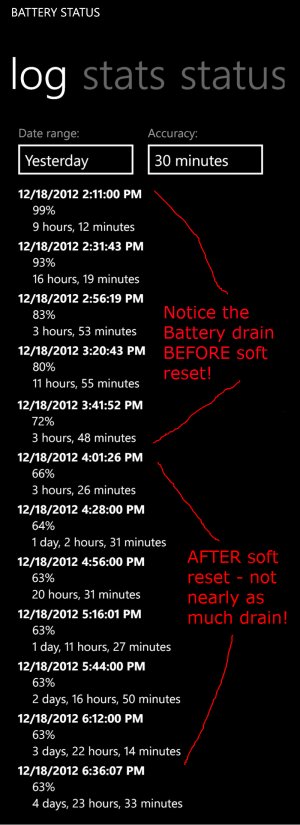
Whenever I have a feeling battery drain is going on, I do a soft reset. It seems to do something to help the battery. I've done it maybe 3 or 4 times and its worked flawlessly every time to fix the battery drain.

EDIT - Here's my battery stats from yesterday - you can see exactly where I did a soft reset. My phone was draining for NO REASON before that - nothing was going on - it was sitting on a counter not being touched. I went to check my email and noticed it was draining, so I did a soft reset, and you can see the results right after that. To soft reset, hold both the power + volume down button for 10 or so seconds. Works every time.

battery.jpg
 
Last edited:

Forum statistics

Threads
342,826
Messages
2,265,905
Members
428,880
Latest member
stoobtnelis