[BETA] Amazing Weather HD 5.0

eizsoft

New member
Jun 2, 2011
54
0
0
Hello,

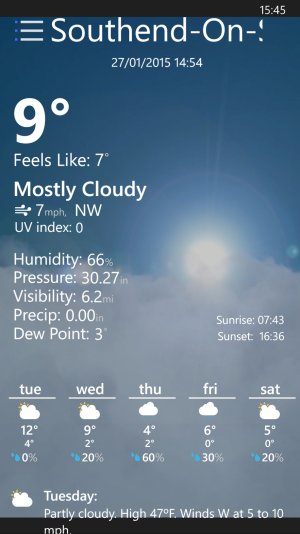
It's been a while since our last update, but we really hope it is worth this wait. This version is all about efficiency, speed and usability. All you need to know about how's the weather doing can be found in one pleasantly organized page. Scroll up and you'll get an improved hourly forecast, quick glance text forecasts radar imagery and moon phases. And if you want even more, just tap on an item to go to the details of it.

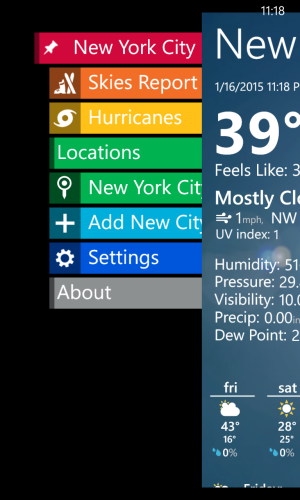
One thing we're proud to present is our new navigation pane. It's one simple swipe to the right! Want to pin a city? Check. Change the city without rotating through all of them? Tap away! Add, remove cities? Another swipe to the right and it's gone!

We really wish you enjoy this beta, and provide us with your feedback and bug reports with screenshots if applicable at [beta@eizsoft.com] we will try our best to give you the best.

if you would like to join the new BETA just follow this Google forms link and add the required information. BETA Form

Note: This beta might expire in the future.

Redesign.png
 
I assume Microsoft doesn't allow it, but the only reason I switched from the excellent Amazing Weather app is that MSN Weather works on Glance. Would it be right to guess that Microsoft doesn't allow for third-parties to do the same?
 
I assume Microsoft doesn't allow it, but the only reason I switched from the excellent Amazing Weather app is that MSN Weather works on Glance. Would it be right to guess that Microsoft doesn't allow for third-parties to do the same?

Maybe? I haven't seen the API's for it yet. I did see a dev (on youtube; last year) tinkering with a live gps tracker for the lockscreen, but he admitted that it would drain battery lol
 
So, I just downloaded beta... 58mb?!? Why so much? Like it for now, will use it and give feedback in a couple of days... Btw, it would be nice if you change animations. Not that they're not nice, but for change. :)
 
So, I just downloaded beta... 58mb?!? Why so much? Like it for now, will use it and give feedback in a couple of days... Btw, it would be nice if you change animations. Not that they're not nice, but for change. :)

The animations are what make it so big. He should have available a separate one without the animations and colored tiles. Minimal size with transparent tile. Would be much better for me IMO
 
I like it, it seems to work ok, though it did freeze once with no info on the screen, just the background was showing. It might be better when swiping right, if the new menu takes up the whole screen instead of leaving some of the actual weather page on the right side. Also if you were to get rid of the partial weather display when the menu is showing, then maybe add an OK or DONE button at the bottom of the screen to allow the return to the weather page...

Good job so far, love the app. Had Amazing Weather on my phone since the Windows Phone 7 days :)
 
New app is great. Am I the only one who thinks it would be great if the dark metro UI theme was actually black? I'm not sure why but that gray color is off-putting.
 
AMOLED + Black Background = Win

I meant in the actual weather app... The realistic theme is great and all but I got bored with it. I want clean and simple. The light theme is full blown white and it looks nice but it's pretty bright, the weather is typically once of the first things I check when I wake up and staring at a white screen bugs my eyes when I just finished opening them lol. Anyway back on topic; the dark theme in the app isn't black like the system theme, it's a dark gray color similar to the dark theme keyboard. It would be nice if it was actually black. Oh and for the record amoled's ridiculous contrast ratio always makes colors pop to the point of almost being cartoonish. I've always preferred IPS LCDs.
 
Last edited:
I meant in the actual weather app... The realistic theme is great and all but I got bored with it. I want clean and simple. The light theme is full blown white and it looks nice but it's pretty bright, the weather is typically once of the first things I check when I wake up and staring at a white screen bugs my eyes when I just finished opening them lol. Anyway back on topic; the dark theme in the app isn't black like the system theme, it's a dark gray color similar to the dark theme keyboard. It would be nice if it was actually black. Oh and for the record amoled's ridiculous contrast radio always makes colors pop to the point of almost being cartoonish. I've always preferred IPS LCDs.

Yeah, I understood you from the beginning haha.

IPS LCD is meaningless these days. Even the cheapest of panels are labeled IPS, its ridiculous.

Not saying IPS panels are bad, a great LCD is always going to be sharper than an AMOLED one. Image persistence is less of an issue too.

I like AMOLED for reading code. Wish there were an affordable OLED monitor.
 
There is one thing I don't like about Amazing Weather HD. It is showing a green grass and summer sun on the tile for "Clear" even when it's like -17C and a lot of snow around. :p
 
This app needs much better lock screen pictures. It also needs separator between text and picture on the lock screen. Also,I don't like animation for clear night.
 
I don't know if it's just me, but the background image seems to be cropped top and bottom on my L930.

l930.jpg

Still think you should lose the partial weather display when using the right-swipe menu...
 

Forum statistics

Threads
343,457
Messages
2,266,545
Members
428,914
Latest member
zenadrone