
Can we increase Text Font size of Tiles in Lumia 950 XL?

Saad Rashid

New member
Feb 8, 2016
55
0
0
Greetings

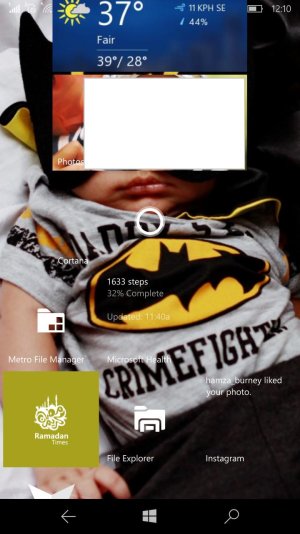
I am having issue of text font size for tiles being very small. Its probably because of high PPI of display. Previously I had 1020 and font size was easily readable. But in 950 XL I have to concentrate hard to read what's the Calendar or Email Tiles say. So can we change the Font size of tiles?
 
Greetings

I am having issue of text font size for tiles being very small. Its probably because of high PPI of display. Previously I had 1020 and font size was easily readable. But in 950 XL I have to concentrate hard to read what's the Calendar or Email Tiles say. So can we change the Font size of tiles?

have you tried changing the display scaling to a higher value? And changing the text size too in settings - one of these might do it
 
Changing Text size in ease of access doesn't affect it. But when I changed it from "Display settings" from 350 to 400, the text in tiles got a bit larger but the whole interface of phone started giving ugly look. e.g Text messages interface seemed to be deformed
 
Changing Text size in ease of access doesn't affect it. But when I changed it from "Display settings" from 350 to 400, the text in tiles got a bit larger but the whole interface of phone started giving ugly look. e.g Text messages interface seemed to be deformed

so forget the text size setting; there's a third setting I remember - in display options, is there an option selected to show more tiles? Is it on? Switch it off if available - that should reduce the number of tiles in the screen width thus making them bigger

Though I'm not sure if this options exists for the 950xl
 
post a screenshot of the start screen with the tiles if you can. I want to see how small the text is considering the 950xl has a big screen
 
Hah, you have the opposite problem I do, I want smaller text on the tiles myself, so I can see what my pinned websites actually are;-]
With 4 weather websites, they more or less look the same, at 300%. I can go to 250%, which helps, but boy that text gets small everywhere, and I (by some miracle, as a software engineer for a long time) have nearly 20/20.
I hope someone figures out how to make yours bigger, which in theory would solve my problem too.
I posted more or less the same question several months back, also wondering if I could have my tile that grabbed the website background, like in 8.1, which would've solved my issue too.
Simple pinned tiles on W10m are a bit "hampered", compared to 8.1, IMO.
 

Trending Posts

Forum statistics

Threads
342,345
Messages
2,265,423
Members
428,866
Latest member
Android_Creator
