Cannot Download attachments in MMS with new 10136 Build

sealuva

New member
Oct 9, 2014
12
0
0
Does anyone else have this problem. I get an error when attaching a picture to a text message, to retry which does not work. If someone sends me a picture it just shows a download button, but nothing downloads if I hit it.
I have a Lumia Icon on Verizon. Thanks
 
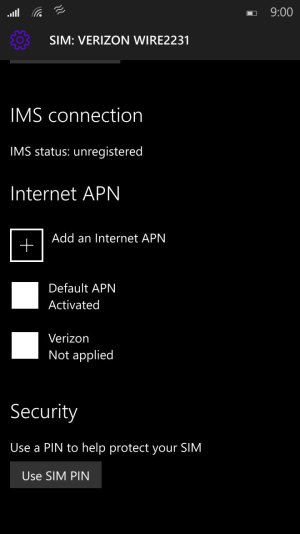
Ditto, used to get the download button. Factory reset phone, now don't even know if picture message was sent, no indication. When trying to send pic, it just shows try again. Checking the sim card settings shows an internet apn but no mms vpn, should there be one there? Verizon/Icon
 
I found the MMS APN settings, but I don't know what info I should input (I'm Verizon/Icon, as well).

Go to Settings, Network & wireless, Cellular & SIM, and then tap on "SIM 1." It should bring up a "Properties" button. Tap that and scroll all the way to the bottom.

Does anyone on Verizon know what the settings should be?
 
I too have a lumia Icon. I am having the same problems... maybe they didn't fix the MMS bug from 10080 like they said.
 
Yes, I was able to get one MMS picture once by adding an MMS APN. However, it still doesn't work like it should. There are a few internet links that tell you how to configure the MMS APN but I'm only getting the Download button and the Try again (when sending). Hopefully this can get fixed soon!
 
yeah i cant get mms either fmlll makes it pretty much unuseable for me - although the lag is definitely gone compared to the previous build 80
 
This build just has too many bugs still to keep in as my daily driver. I will hope they fix important bugs like this one and a few others soon.
 
Seeing this thread had me worried. I just tested, and I am able to send MMS photos with no trouble here after upgrading from WP 8.1 Update 2 to Windows 10 TP mobile. On AT&T network, though. Seems it's a problem with Verizon, and possibly an Icon issue. Bummer. Glad I didn't get that bug, but it is definitely something that needs to be fixed. The Icon was one of the few flagships released, and it needs to be give proper attention.
 
Yes, I was able to get one MMS picture once by adding an MMS APN. However, it still doesn't work like it should. There are a few internet links that tell you how to configure the MMS APN but I'm only getting the Download button and the Try again (when sending). Hopefully this can get fixed soon!

I contacted Verizon and they told me what settings to use, and I was actually able to receive a picture once after adding the settings as well, but I was never able to send any. I rolled back to 8.1.​ I can't deal with not having MMS. It's a shame too because I was really enjoying that build. Oh well...maybe the next one.
 
The problem is, on the Icon there is no option to update or configure the MMS APN Settings, does anybody know a work around? This is on build 10149:

APN.jpg
 
I'm surprised still no comment on this. Is would be nice for MS to confirm its a known issue that can't be resolved on the phone but is being worked on by the dev team.
 
I contacted AT&T yesterday and there was nothing they could do because the options are not in this build in settings. so I did a hard reset and lo and behold. My home screen looks better and I can send and receive MMS messaging. Also Skype is on there and working. I think now when I left the last build my phone didn't complete its update or it could be that the hard reset forced it to correct. Also during hard reset chose the option to not install saved back ups is what I chose
 
The problem is, on the Icon there is no option to update or configure the MMS APN Settings, does anybody know a work around?
I have a hunch that hard resetting after installing the update leads to this issue. The hunch is based on my experience without taking the time to reproduce/validate. I was having MMS issue where I hadn't previously. Previously I hadn't done a hard reset post-update. Last night I used the recovery tool to go back to 8.1 - at which point MMS was working again. I didn't restore a backup (not sure if this matters) and simply installed Windows Insider and updated to 10149 build. Again, didn't restore a backup, and MMS is still working now on the latest build. So my assumption is that the hard reset I had previously done post-install is what caused the MMS problems. Worth giving it a try for those of you still having problems. (FYI: this was on a Lumia Icon/Verizon)
 

Forum statistics

Threads
341,952
Messages
2,265,030
Members
428,851
Latest member
Marchwind1949