
continuum in action

landcameras

New member
Jul 30, 2013
46
0
0
so I picked up the 950 from AT&T today. Id planned on going straight to Microsoft, but they have no stock of their own phones. if they get stock at a store in the next 15 days I may return this and grab the unlocked model.
anyhow I've been playing around all afternoon. haven't seen many Continuum reports, so here's mine.

continuum works perfectly in wireless mode to my Roku 3 using its screen share function. pretty dang cool I must say!
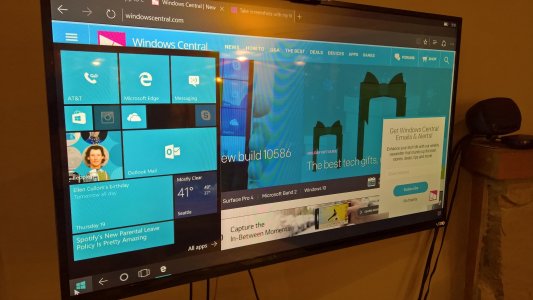
WP_20151119_21_18_34_Pro.jpg
photo edited for size and taken with the 950 of itself on my roku running on my TV.
What doesn't work: Tried to take a screenshot (VOL UP + POWER) and all I got was a shot of the phone screen. Maybe there is a better way to do that from the onscreen keyboard since I didn't have one attached.
 
Last edited:
Fantastic Option, very ambitious and ' FLAGSHIP' ish.. Thanks for sharing .I'm excited!!!!
 
I'm impressed for sure.
There is a duh app missing though, Remote desktop. The IT saviour would be to use a phone to remote into work, diagnose a client and a million other uses. Seems like a logical launch app to me, but no it launches in phone mode.
 
Did you get the dock from AT&T?

He mentioned using a Roku in screen share mode.

I also played with continuum last night (using 2 different Miracast dongles). The apps that were compatible worked great. I just wished it were easier to switch between continuum and Miracast .
 
He mentioned using a Roku in screen share mode.

I also played with continuum last night (using 2 different Miracast dongles). The apps that were compatible worked great. I just wished it were easier to switch between continuum and Miracast .
I found the bar that is always on top a bit intrusive. Found myself wising it was like that floating tab from the PC remote desktop app. Where you could grab it and pull it down. I also wanted the ability to to move things from screen to screen. I know that gets into a bit of different territory, but in the end i'd hope Continuum will function simply like a multi-monitor setup.
 
Dumb question. If you're screen casting to a Miracast, how do you use a keyboard and mouse without the dock?
 
Dumb question. If you're screen casting to a Miracast, how do you use a keyboard and mouse without the dock?

Bluetooth? I didn't do it myself and just used the on-phone touch mouse and keyboard. I was too lazy to go dig up some old bluetooth equipment. I'll do it this morning before work.
 
I was also able to get it to work using my Roku stick, but the resolution was 4/3 and I couldn't figure out a way to change it to 1080P 16/9. I've had the same issue with my Surface, but I could always adjust it though advanced properties of the display device. Not so much here.
 
Dumb question. If you're screen casting to a Miracast, how do you use a keyboard and mouse without the dock?

bluetooth, usb otg, or you phone's screen. your phone can be a "touchpad" and the on screen keyboard on the 950 pops up when you go to a text field.

what's interesting, i tested video streaming. using miracast screen mirroring, there were frame drops like always, using continuum (movies and tv app) hd video streamed flawlessy
 
bluetooth, usb otg, or you phone's screen. your phone can be a "touchpad" and the on screen keyboard on the 950 pops up when you go to a text field....
I think there is still a misconception out there that Continuum must be used with the dock, or at least a cable. Clearly that isn't the case
 

Trending Posts

Forum statistics

Threads
342,511
Messages
2,265,593
Members
428,871
Latest member
breadcat
