Glance and Double tap not working[Denim-L620]

SlobodanNesic

New member
Mar 6, 2015
35
0
0
Ok,so after update to Denim,I saw some new features Double tap and Glance.But sadly none of them works.
I set Wake Up to on and nothing happens after tapping the screen,and glance is not working too(waved my hands like crazy over the phone but still nothing)
Am I only one or its usual thing for L620?
 
Have you checked the proximity sensor. Both won't work if the sensors covered by something. Mine is still work, but glance background is not anymore.
 
When I make a phone call,screen goes black and turns on when I end the call.So something is wrong with proximity sensor.
Any way to fix that?
 
When I make a phone call,screen goes black and turns on when I end the call.So something is wrong with proximity sensor.
Any way to fix that?

Just try cleaning the screen. You have any flip cover? Just asking to get info.
Why not just restart phone?
If glance has to work.. set it ALWAYS ON on charging.. and plug-in... You will see results soon.

Give a try with updates and then take the glance settings.. it may ask for restart...
 
Glance doesnt shop up again,not even while charging

would like to make sure you have checked for updates. because My L620 also behaved differently before updates[glance].
if you have updates [windows store-> settings -> check for updates ] wait for it to install. then open the app and see if it asks for restart.

else u try restart or reset [soft.. volume_down+power for 10 seconds ]
 
When I press Volume down and Power/Lock button a screen comes asking me to slide down to turn off
But thats no reset.Whats going on?Both keys are working
 
funny,I tried it under heavy light and glance worked.But only under direct strong light,nothing else....strange..........
 
When I make a phone call,screen goes black and turns on when I end the call.So something is wrong with proximity sensor.
Any way to fix that?

Hi, are your phone goes black right after and all the time when in phone call, or only when your phone near your ear (or you can test by cover/hover the sensor with hand)?
If your screen always black when calling even nothing near screen it might be your proximity sensor has problem.
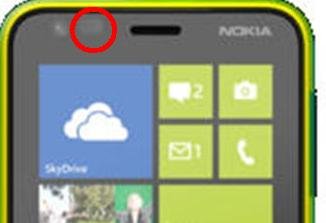
The sensor is here:
620.JPG
You can try to clean it. And that sensor should not covered by anything, even with transparent screed guard. Are you using some kind of screen guard?
 
I have checked mine, I tried to place my finger on the sensor, make it look like an object really close to the sensor.
When I turn on the glance, even I set it to always on & when charging. The glance won't show up. But when I lift my finger about 3 cm it appear again. So I think your proximity sensor is covered by something, try to remove everything near it.

But if your sensor is just broken, I think it still can show the glance, since sensor need to read something nearer than 3 cm to turn off the glance, if the sensor doesn't work it would simply think "nothing near sensor".
 
As I said Glance only shows when pointing a direct light at it.
my sensor is not covered with anything...Maybe its just broken....