Groove music problem is it working properly?

scrums

New member
Nov 16, 2015
2
0
0
Groove music problem;

Hi all

My first post here - so be nice !

Running 10581 - I have very carefully moved all my albums with embedded album art into music on the sd card (Lumia 640)

In album view - the album art is there, but on playing a track from an album it picks up an obscure photo of the artist from somewhere rather than the album cover - is it me, or is it operating correctly ?

Cheers,

Chris.
 
Re: Groove music problem;

scrums welcome to the forum! Though I am new to forum too I am bit older than you to this forum. :wink:
I am surprised to see you are able to access local music files in Groove music. In my case Groove was not showing me any music from SDCard. Anyway, in settings there is option to check download/show artist for missing album art. Just uncheck that and it should work. (Unless there are bugs)
 
Re: Groove music problem;

Thanks for the reply - I'm talking windows mobile 10 here ?

Nothing like that in settings:unhappy:
 
Re: Groove music problem;

Unfortunately I have reverted back Windows 8.1 on my Lumia 640 so I don't remember exact location of the setting. However check for gear icon in Groove app, there is slider to turn off - "Automatically retrieve and update missing album art and metadata". If you cannot find Gear icon look for option called "Choose where we look for music" it on the same screen.
 
Re: Groove music problem;

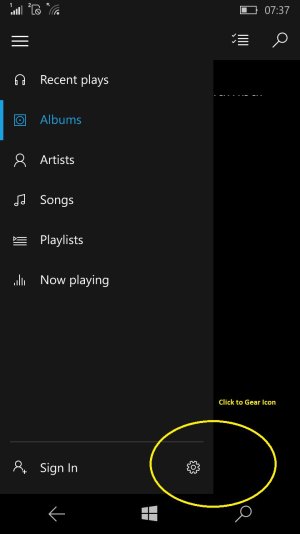
Open Groove music app on your phone and click on 3 Horizontal lines on top left corner.
Now click on Gear icon as shown in attached screenshot.
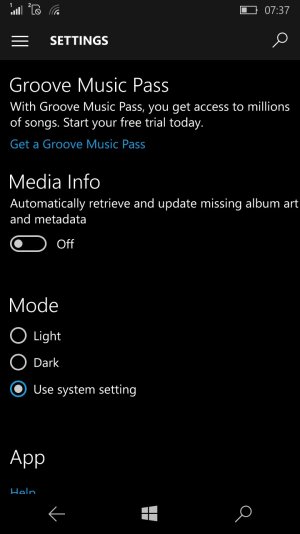
Now turn off slider under "Media Info" as shown in 2nd attached image.

Please find attached 2 images.

wp_ss_20151120_0001.jpg
 

Attachments

  • wp_ss_20151120_0002.jpg
    wp_ss_20151120_0002.jpg
    98 KB · Views: 0

Forum statistics

Threads
341,937
Messages
2,265,015
Members
428,851
Latest member
emitbrown1977