
Hello together,
i got my Samsung Ativ S a few Weeks ago.
My Computers don't want do recognice it as ATIV S. Two Windows 8 x64 Laptops and my Windows 8 Desktop are not able to Display the telephone storage or the micro sd-card.
Also the Windows Phone Syncronisation application is not starting neither as Desktop applicaition or Modern-UI-App.
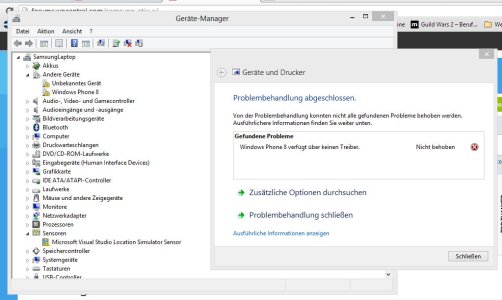
But I think that it's not a problem with the phone because the PC in my company (Windows 8 x64) recogniced the Phone properly.
I tried all tipps from the internet, including installing the driver manually from the windows update library.
I really would love to see my Ativ S working fine with my PCs so im hoping someone can provide me some help.
Thank you verry much
Joschka
i got my Samsung Ativ S a few Weeks ago.
My Computers don't want do recognice it as ATIV S. Two Windows 8 x64 Laptops and my Windows 8 Desktop are not able to Display the telephone storage or the micro sd-card.
Also the Windows Phone Syncronisation application is not starting neither as Desktop applicaition or Modern-UI-App.
But I think that it's not a problem with the phone because the PC in my company (Windows 8 x64) recogniced the Phone properly.
I tried all tipps from the internet, including installing the driver manually from the windows update library.
I really would love to see my Ativ S working fine with my PCs so im hoping someone can provide me some help.
Thank you verry much
Joschka



 Facebook
 Twitter
 Instagram