
Hell-o! We have a problem Houston!
- Thread starter holdum333
- Start date
You are using an out of date browser. It may not display this or other websites correctly.
You should upgrade or use an alternative browser.
You should upgrade or use an alternative browser.


Laura Knotek
Retired Moderator
- Mar 31, 2012
- 29,451
- 63
- 48
That's really odd. I haven't experienced that so far.
Have you tried clearing your cookies and cache?
Have you tried clearing your cookies and cache?

- Oct 2, 2016
- 2,206
- 0
- 0
No I haven't ! Thanks I'll give that a try!:wink:That's really odd. I haven't experienced that so far.
Have you tried clearing your cookies and cache?
Nope! No cigars! It was worth a try!:wink:
Attachments

- Oct 2, 2016
- 2,206
- 0
- 0

- Oct 2, 2016
- 2,206
- 0
- 0
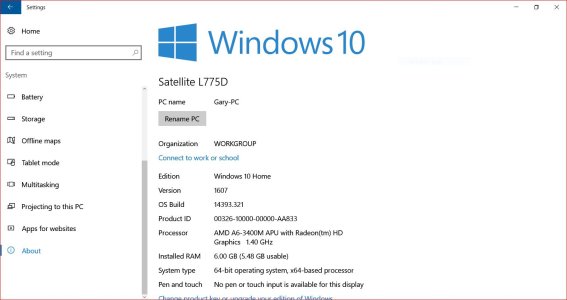
Hi friend! Yes its correct. Here's some more information. When I click on a forum, all is cool. When i click on a post in the forum, the spinning wheel starts and never stops. I don't remember it doing that.:wink: To me, it looks like it's loading. It will finally stop, but it spins for several minutes! While typing this reply, the spinner finally stopped. It now has the Windows Central icon instead of the spinner. I hope this is making sense.Is your system time and date correct?
Thanks for helping!:wink:
- Oct 2, 2016
- 2,206
- 0
- 0
Hi! I logged on with IE and I'm not having the issue. Has to be Firefox. :wink:
I don't like IE, but we know it's not the sites issue!
Thanks everyone. You are appreciated! Here's the problem, but at this moment I don't have a clue. If I click on the x the spinner stops.
This is a problem for you smart people. It will finally stop on it's own after a couple of minutes. Seems to me like it's down loading.
I don't like IE, but we know it's not the sites issue!
Thanks everyone. You are appreciated! Here's the problem, but at this moment I don't have a clue. If I click on the x the spinner stops.
This is a problem for you smart people. It will finally stop on it's own after a couple of minutes. Seems to me like it's down loading.
Attachments

Last edited:
- Oct 2, 2016
- 2,206
- 0
- 0
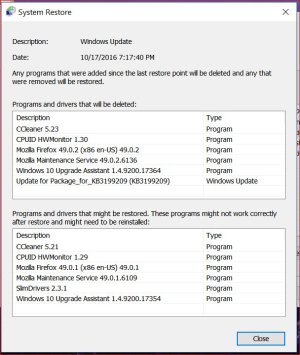
Hi Are you sick of me yet? I'm trying to figure this out and it ain't easy. We all know that Microsoft is smarter then us old country folks. We aren't smart enough to know which updates we don't want. Here's my theory. Microsoft up dated my Firefox and I'm thinking that's when this all started. Am I crazy? Don't answer that.:wink:
What does this tell you?? I'm thinking Microsoft is going a little to far! Surely they have smart people that will fix all this. LMAO Really this is starting to scare this old country boy! Did Firefox update or did Microsoft update?
What does this tell you?? I'm thinking Microsoft is going a little to far! Surely they have smart people that will fix all this. LMAO Really this is starting to scare this old country boy! Did Firefox update or did Microsoft update?
Attachments
- Oct 2, 2016
- 2,206
- 0
- 0
Hello Sports fans. Here's the bottom line. I have been to Hell and back. I have one friend and that is Macrium Refect.. I tried to restore to a earlier time. That locked up my PC. All the windows restore options suck. I'm so glad I had a back up image that I was able to restore to. It's been a long night and I'm really tired. Once again Macrium Reflect saved my ***. All is well in Okie land and with a few updates, this old country boy will be back up and running just like none of this xxxx ever happened. I'll see you all on the forum tomorrow. Good night special friends!:wink: It's really hard to get this old country boy down, so bring it on Microsoft.:wink:
PS no more spinners! Yea!
PS no more spinners! Yea!

James Falconer
New member
- Nov 1, 2012
- 1,891
- 0
- 0
@holdum - glad the 'spinners' have stopped for you. If you experience again, let me know what you do to create the problem (along with browser/OS details) and I'll take a look.
- Oct 2, 2016
- 2,206
- 0
- 0
Thank you my friend! After using Macrium, I used the MCT to do a in-place upgrade. It seemed to work. Took for ever, but I think I'm back to normal again.@holdum - glad the 'spinners' have stopped for you. If you experience again, let me know what you do to create the problem (along with browser/OS details) and I'll take a look.
Will wait and see what happens. You are much appreciated! Thank you!:wink:
- Oct 2, 2016
- 2,206
- 0
- 0
Hi I give up! The Spinner is back. It's only in Firefox. IE works fine. I have uninstalled Firefox and reinstalled it. It works normally for a while. Not really causing any problem. Just annoying! I just don't understand why it's loading the page?
The only way I can stop it is clicking on the X
The only way I can stop it is clicking on the X
Attachments

Last edited:
- Oct 2, 2016
- 2,206
- 0
- 0
Hi I really would like to solve this. I don't give up easily. I'm a 12 year cancer survivor, so give up is not in my vocabulary. I do not have this problem on other help forums and it just started happening here. No problems (spinners) on this help forum! No spinners here!:shocked:
PS the spinners happen when I try to move around in the forum. Example going from 'Ask A Question' to 'Windows 10'. It's really crazy and only happens here on this forum. I have done a lot of research on this. I'm thinking I need to get a real life.:shocked: I'm always up for a challenge. You want a challenge; figure why this happens here and not on other forums.:smile:
PS the spinners happen when I try to move around in the forum. Example going from 'Ask A Question' to 'Windows 10'. It's really crazy and only happens here on this forum. I have done a lot of research on this. I'm thinking I need to get a real life.:shocked: I'm always up for a challenge.
You want a challenge; figure why this happens here and not on other forums.:smile:Attachments

Last edited:
James Falconer
New member
- Nov 1, 2012
- 1,891
- 0
- 0
 Thanks for letting us know!
- Oct 2, 2016
- 2,206
- 0
- 0
Hi For everyone following this thread, I have just discovered that if I log off and back on, the spinner problem goes away. This makes me think it's possibly a site problem. I can't prove that, but it seems possible. I don't have this problem on other help forums. It's very strange, to say the least!:wink: Could it be a problem with the server; but why am I the only member having this problem?????
Similar threads
- Replies
- 0
- Views
- 32K

- Replies
- 0
- Views
- 34K
- Replies
- 2
- Views
- 42K

- Question
- Replies
- 0
- Views
- 9K

Trending Posts
-
-
 Windows 10 Themes no longer working...
- Started by DocCovington
- Replies: 6
Forum statistics

Space.com is part of Future plc, an international media group and leading digital publisher. Visit our corporate site.
© Future Publishing Limited Quay House, The Ambury, Bath BA1 1UA. All rights reserved. England and Wales company registration number 2008885.
 Facebook
 Twitter
 Instagram