
Help us test new Mobile Mod Features?

James Falconer

New member
Nov 1, 2012
1,891
0
0
Hey all,

Quick note. Navdeep has been working on adding in more moderation function in our mobile forums templates for the past few days. For anyone that uses the mobile site, could you give these a quick look and test?

To access moderation options, all you need to do is tap the circle icon with the 9 little squares in it (this button is available at the top and bottom of each page). Once that button is in the 'active' state, check off the posts/threads you want to perform mod actions for. THEN, all of the different mod options will appear at the bottom of the page.
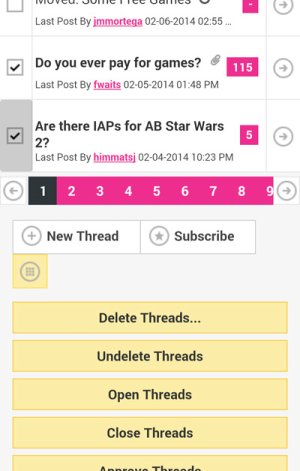
mobile-tools.jpg

Select the mod action you'd like to perform, and have at it. If you could give this some testing I'd appreciate it. Right now Nav has this installed on WPC only, and if all good we will roll out everywhere else.

Thanks!
 
Does that bug still exist where one is stuck with the mobile view once he/she switches? I remember that was a problem when the new mobile view was originally introduced. http://forums.windowscentral.com/wpcentral-com-site-news-feedback-help/238891-mobile-forums.html

I need full desktop site when banning spammers via mobile, since I need Passport. I'm reluctant to switch to mobile view if it'll make me get stuck there with no way back. No, I won't reset my device just for that.
 
I tried to infract a spammer and just got a message saying "There are no infraction levels defined."
 
Does that bug still exist where one is stuck with the mobile view once he/she switches? I remember that was a problem when the new mobile view was originally introduced. http://forums.windowscentral.com/wpcentral-com-site-news-feedback-help/238891-mobile-forums.html

I need full desktop site when banning spammers via mobile, since I need Passport. I'm reluctant to switch to mobile view if it'll make me get stuck there with no way back. No, I won't reset my device just for that.

You should be able to switch back by tapping 'view full site' on the mobile template.
 
Can you detail the steps you took? (screens would be helpful too)

Oddly enough I can't get this to replicate now. I have a feeling it's something to do with going over to the mobile template from the full site. I was at the forum post on the full site template, went over to the mobile template and other pages would load properly with the mobile template but there was no way to get the page I had previously loaded in the full site to load on the mobile template. I hit the infraction button and it just came up with a yellow box saying "There are no infraction levels defined."

When I just tried to replicate it now, the page loads on the metro template fine and when I press the infract button it comes up with a message box, but no list to say which infraction I'm picking - this page really needs to mirror the full site.
 
I'll check em out. Glad to see they're here but overall I'd really like the keyboard drop problem to be fixed on the desktop site. Makes it so hard for me to issue infractions and the like.
 
Oddly enough I can't get this to replicate now. I have a feeling it's something to do with going over to the mobile template from the full site. I was at the forum post on the full site template, went over to the mobile template and other pages would load properly with the mobile template but there was no way to get the page I had previously loaded in the full site to load on the mobile template. I hit the infraction button and it just came up with a yellow box saying "There are no infraction levels defined."

When I just tried to replicate it now, the page loads on the metro template fine and when I press the infract button it comes up with a message box, but no list to say which infraction I'm picking - this page really needs to mirror the full site.

Again, can you post a screenshot of the message box you see? Would like to see what's going on here so that we can fix.
 
I've managed to replicate this. I will post steps tomorrow when I get back with pics.
 
In general I find our site rendered very poorly on IE10 on my WP. I don't know if it's our site or just IE but those huge grey boxes are annoying. I hardly tap on the right place in the first go! However, shall try and do my bit of testing. Can we not make this site look any prettier on mobile IE?
 
Thanks please let me know what you find after testing.

In regards to making the site look nicer, trust me, I feel your pain. We are working on a number of things for the coming year, so all I can tell you is we want to fix things up so that you get a full responsive (and pretty) experience on all browsers, devices, etc.!
 

Trending Posts

Forum statistics

Threads
343,228
Messages
2,266,309
Members
428,900
Latest member
YeOldRam
