How do I block a specified number, not from call history?

Jooow

New member
Jan 9, 2014
2
0
0
Hi

So I just got this phone second-hand and I'd like to block some numbers of telemarketers.
I know I can block numbers from call history, but how do I block someone that has not called me yet?
I couldn't find any option to do this.
 
Thanks for reply, but unfortunately I was still unable to do it. At contacts I only get the options: Pin to start-screen, edit or delete.
It really doesn't make sense that I have to call someone just to get the number in call history before I'm able to block that person.
 
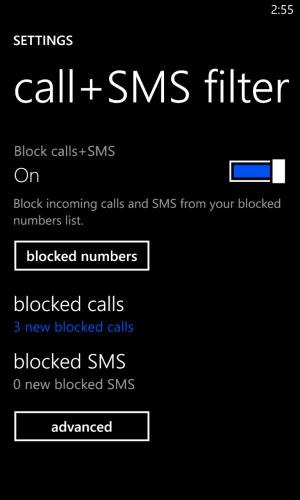
If you look in settings, you should see a call+SMS Filter option. Clicking on it will open a window like below.

wp_ss_20140109_0001.png

You can add numbers directly here. I turned on the option to block private numbers (blocked). It's simple and works like a champ!!
 
You have to add the numbers to a contact, and block that contact. Silly, I know.

You don't have to add the number to a contact. Just call the number and hang up right away. Now it is in your call history and can be blocked from there.

If you look in settings, you should see a call+SMS Filter option. Clicking on it will open a window like below.

View attachment 54075

You can add numbers directly here. I turned on the option to block private numbers (blocked). It's simple and works like a champ!!

You can't add numbers from there, only view numbers that have been previously added.
 

Trending Posts

Forum statistics

Threads
343,259
Messages
2,266,340
Members
428,902
Latest member
niedrie