How to rollback from Windows 10 TP for phones to Windows phone 8.1.1

Vivek R

New member
Jan 20, 2015
5
0
0
In order to roll back from windows 10 TP to Windows Phone 8.1.1.
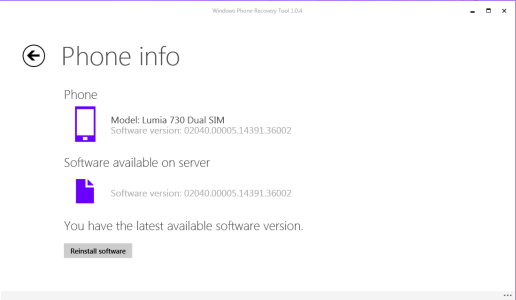
1. Use Windows Phone recovery tool.
2. identify your phone,
3. software will search in internet for any respective phone updates.
4. Then hit reinstall(rollsback to 8.1.1)
Windows Recovery.png

5.From gabe
 
Does this put your RM number back to normal? I have a Lumia 1020 but the model is showed as RM-1027 which is the Lumia 635 I believe.
 
Does this put your RM number back to normal? I have a Lumia 1020 but the model is showed as RM-1027 which is the Lumia 635 I believe.

yes it will...you'll have to re-do the preview for developer to get back to 8.1.
 
Yes. It'll revert back to original RM number. since it cleans and reinstalls entire OS. It seems like Windows 10 For phones TP installs like in-place upgrade over 8.1.1 that's why you don't see that many apps installing when you are done with Windows 10 for phone TP, which normally happens when you upgrade ur OS.

Also it's advisable to have denim firmware before upgrading to Windows 10 since there are reports that it works better with Denim than with Cyan, Black.
 

Members online

No members online now.

Forum statistics

Threads
341,202
Messages
2,264,267
Members
428,831
Latest member
Wiseguy