

- Jul 31, 2011
- 161
- 0
- 0
Contacts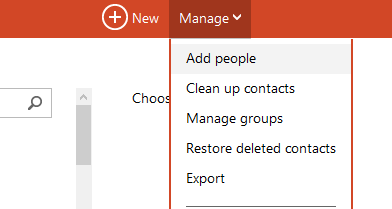
Mail
There are 2 ways to really go about this. Create an email address(@outlook.com, @live.com) or use your existing Gmail account. If you really want to go through the full switch, I recommend just going with making a new email address. (Skip down to the bullet about linking Gmail if not)
Calendar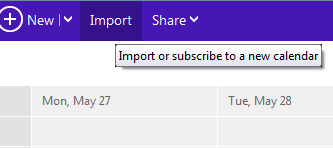
F.A.Q.
Can I use "TrueSwitch" to do this?
Not anymore, as TrueSwitch has shutdown as of May 15, 2013.
Why should I switch?
Outlook is more modern, has more features(subjectively) and Google is dropping support for EAS.
My Gmail emails aren't getting forwarded instantly, why?
Well this tutorial is ideal if you want to completely rid yourself of any Google services, so you'd want to change all things that originally send to your Gmail(bills, newsletters) to go to your new Outlook email
What do I do if I have created a Live ID and subsequent Xbox Gamertag that is associated with another email address from a different provider?
Check out this post (thanks BitPusher2600)
Will this work to upgrade from Hotmail?
Yes, Outlook is essentially a giant overhaul of Hotmail. See here
My LiveID is an alias to a domain other than Hotmail or Outlook (such as Gmail). TrueSwitch does not seem to be working. What can I do?
Check out this post (thanks Matt M.)
If you have any other FAQ-type questions, please PM them to me and I'll add them to this post.
- Go to http://gmail.com
- On the left side, click the dropdown that says 'Gmail', and click 'Contacts'
- At the top of the contacts list, click the 'More' dropdown, select "Export..."
- Select the contact group, most likely 'All Contacts' and then select 'Outlook CSV'
- Click 'Export' and save it somewhere(contacts.csv)
- Go to Sign In
- "Add people to your contact list" should be available, select "Import from file"
- Select the file you downloaded earlier
- Be sure to clean up and duplicate contacts by clicking the "Manage" dropdown on the main People website and selecting 'Clean up contacts'
There are 2 ways to really go about this. Create an email address(@outlook.com, @live.com) or use your existing Gmail account. If you really want to go through the full switch, I recommend just going with making a new email address. (Skip down to the bullet about linking Gmail if not)
- To create a new email address, go to http://signup.live.com (note if you have a Windows Phone, you should have one)
- Once you have your new Microsoft account, click the Settings gear at the top right, and click "More Mail Settings"
- Click "Your email accounts"
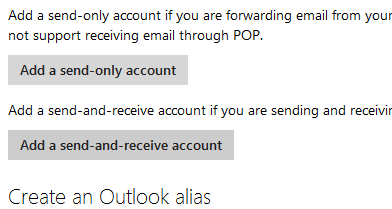
- Click "Add send-and-receive account"
- Enter your Gmail(or other) information
- Over the course of a few hours, all of your mail should be imported automatically, and you should even be able to "send-as" your Gmail account.
Calendar
- Go to http://google.com/calendar
- On the left side where your calendars are listed, click the dropdown and click 'Settings'
- In the 'My Calendars' category, select Export Calendars
- The file will be a .zip, you need to extract the .ics file out of the ZIP.(calendar.ics)
- Go to Sign in to your Microsoft account
- Above the calendar, click "Import"
- Select the .ics file and click Import
- Sign in to Gmail and find your Google Drive folder.
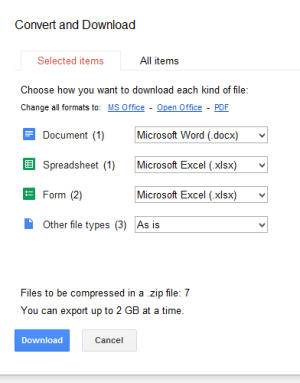
- Select All(shift + A),click More, click Download, and then save your Google Docs as Office documents on your desktop.
- Download SkyDrive here: Microsoft SkyDrive - Microsoft Windows
- Go to your SkyDrive account , and then drag your files from your desktop to your SkyDrive folder(it will automatically sync)
F.A.Q.
Can I use "TrueSwitch" to do this?
Not anymore, as TrueSwitch has shutdown as of May 15, 2013.
Why should I switch?
Outlook is more modern, has more features(subjectively) and Google is dropping support for EAS.
My Gmail emails aren't getting forwarded instantly, why?
Well this tutorial is ideal if you want to completely rid yourself of any Google services, so you'd want to change all things that originally send to your Gmail(bills, newsletters) to go to your new Outlook email
What do I do if I have created a Live ID and subsequent Xbox Gamertag that is associated with another email address from a different provider?
Check out this post (thanks BitPusher2600)
Will this work to upgrade from Hotmail?
Yes, Outlook is essentially a giant overhaul of Hotmail. See here
My LiveID is an alias to a domain other than Hotmail or Outlook (such as Gmail). TrueSwitch does not seem to be working. What can I do?
Check out this post (thanks Matt M.)
If you have any other FAQ-type questions, please PM them to me and I'll add them to this post.
Last edited:



 Facebook
 Twitter
 Instagram