
i need original ditigizer
- Thread starter Eki_13
- Start date
You are using an out of date browser. It may not display this or other websites correctly.
You should upgrade or use an alternative browser.
You should upgrade or use an alternative browser.

f88
New member
- May 29, 2013
- 47
- 0
- 0
Hi there, what type of phone are you using? Replacing a digitizer can be done yourself, and the parts can be found on ebay like you said. Just make sure that whatever you plan on purchasing is a digitizer and not just the glass. Some people on ebay sell glass screens without digitizers for phones like the Lumia 920, and those are useless without the digitizers.
a lumia 920. How can they sel without digitizer?! I thought it was part of the screen. i found this one : Genuine Original Touch Screen Digitizer Lens Touchpad Glass for Nokia Lumia 920 | eBay but it doesn't include adhesive.
i also emailed etradesupply regarding the different digitizers they offer for 920. their reply:
"Thank you for contacting ETradeSupply.com.
Light guide means light which lights up the screen which locates bottom part of the screen.
Yes the last one is genuine the rest is the products has some cosmetic issue scratch... (but not on the surface)."
i also emailed etradesupply regarding the different digitizers they offer for 920. their reply:
"Thank you for contacting ETradeSupply.com.
Light guide means light which lights up the screen which locates bottom part of the screen.
Yes the last one is genuine the rest is the products has some cosmetic issue scratch... (but not on the surface)."
f88
New member
- May 29, 2013
- 47
- 0
- 0
a lumia 920. How can they sel without digitizer?! I thought it was part of the screen. i found this one : Genuine Original Touch Screen Digitizer Lens Touchpad Glass for Nokia Lumia 920 | eBay but it doesn't include adhesive.
Yeah, I've found selling the screen without the digitizer for the 920 is becoming more and more popular, and for someone doing it for the first time, the price is too enticing to look any further into it. The link you posted looks like it would work just fine, and having done this to maybe four Lumia 920s myself, you might get lucky and be able to reuse the adhesive from the first screen, but if you're looking for adhesive, here are a few options (hope they're available to ship in your area, I'm over in Canada):
2X LCD Touch Screen Frame Adhesive Glue Tape FOR Nokia Lumia 920 | eBay
(I personally bought these ones, they're pre-cut so they make things far easier than buying a roll of tape)
2mm Sticker Adhesive Tape FOR Nokia Lumia 920 820 800 Phone FIX Repair | eBay
You'll also need to replace the foam gasket surrounding the digitizer, so light from the navigation buttons don't spill out everywhere. Do you know how to open up the 920? If not, there's a guy on YouTube who makes very good instructional videos on it, his username is LE55ONS.
thanks for your help. i have seen the video on how to open. the only thing i have to find out is how many minutes to use the hair dryer so that i do not damage the lcd screen.
i also found this one: Nokia Lumia 920 Front Panel Touch Outer Glass Digitizer Screen Adhesive Glue | eBay
he mentios that it is oem and includes everything needed, but the nokia logo is missing!
i also found this one: Nokia Lumia 920 Front Panel Touch Outer Glass Digitizer Screen Adhesive Glue | eBay
he mentios that it is oem and includes everything needed, but the nokia logo is missing!
f88
New member
- May 29, 2013
- 47
- 0
- 0
I was actually looking for a link to the ones that I purchased, but they were a few months old so the listings weren't there anymore. That most recent link you just posted might be a slight bit misleading, just because those little tools always come free with most digitizers, and so really you're just paying a lot extra for the adhesive. If I were buying a new digitizer for myself right now, I would consider this one:
NEW LCD Touch Screen Digitizer FOR Nokia Lumia 920 PHI 920T With Tracking Number | eBay
Just ask the seller if the digitizer comes with free tools, and if it does, it might be a good deal. Also, don't worry if you don't see the Nokia symbol in the top corner. They usually cover that in the listings for various reasons, but when it arrives, you can peel away the layer of plastic on top and see that it was just rubbed out with black marker (on the plastic, not the screen).
Edit: One more thing...as for the hair dryer, it doesn't need to be super hot, just hot enough to loosen the adhesive. Personally, I left a small hair dryer on the whole time I spent removing the screen, and while I did need gloves because it was rather hot, it was never so hot that my screen was damaged. I think the main concern with replacing the digitizer is being careful not to dent, bend, or scratch the LCD screen. Keep the hair dryer on low power if you're really concerned, though.
NEW LCD Touch Screen Digitizer FOR Nokia Lumia 920 PHI 920T With Tracking Number | eBay
Just ask the seller if the digitizer comes with free tools, and if it does, it might be a good deal. Also, don't worry if you don't see the Nokia symbol in the top corner. They usually cover that in the listings for various reasons, but when it arrives, you can peel away the layer of plastic on top and see that it was just rubbed out with black marker (on the plastic, not the screen).
Edit: One more thing...as for the hair dryer, it doesn't need to be super hot, just hot enough to loosen the adhesive. Personally, I left a small hair dryer on the whole time I spent removing the screen, and while I did need gloves because it was rather hot, it was never so hot that my screen was damaged. I think the main concern with replacing the digitizer is being careful not to dent, bend, or scratch the LCD screen. Keep the hair dryer on low power if you're really concerned, though.

thanks for your help. the link you posted is from a buyer with 98.6% and seems an aftermarket to me. i wan't to buy a genuine but i think i could never be sure.
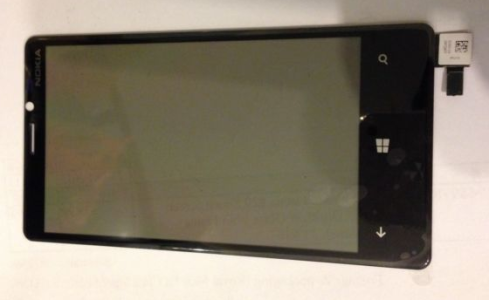
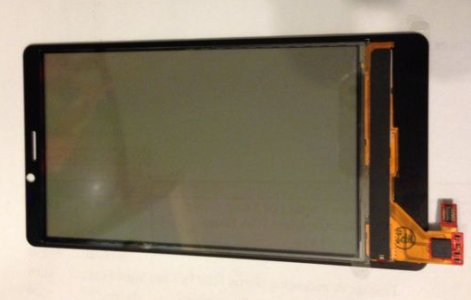
i asked the seller of this link : Genuine Original Touch Screen Digitizer Lens Touchpad Glass for Nokia Lumia 920 | eBay
to send me some photos. do they look genuine to you? he has 100% feedback.
the only thing seems to be missing is the foam gasket surrounding the digitizer. Is it easy to use the old one?
thats the only one i found with foam gasket but it is not oem:
http://www.etradesupply.com/nokia-l...uch-screen-with-adhesive-and-light-guide.html
i asked the seller of this link : Genuine Original Touch Screen Digitizer Lens Touchpad Glass for Nokia Lumia 920 | eBay
to send me some photos. do they look genuine to you? he has 100% feedback.
the only thing seems to be missing is the foam gasket surrounding the digitizer. Is it easy to use the old one?
thats the only one i found with foam gasket but it is not oem:
http://www.etradesupply.com/nokia-l...uch-screen-with-adhesive-and-light-guide.html
Attachments
Last edited:
f88
New member
- May 29, 2013
- 47
- 0
- 0
The pictures do look genuine to me, they look like the ones I bought and used on my phones. There shouldn't be a problem if you grab one of those.
As for the gaskets, they come off quite easily, and it shouldn't be a problem should you find yourself unable to recover it from the old screen. I think I made a mistake and they were actually made of rubber, but I can't recall. I gave away my other 920s, but decided to keep a yellow one that I repaired without its gasket. If I look at the phone from a certain angle, I'll see the light from the bottom keys, but it's hardly an issue for me. If you want the gasket and want to make sure you do everything properly from top to bottom, I say go with something that has the gasket, whichever it may be. That way, should anything happen to the old gasket, you won't have to go out and order something new. One of the most painful parts of this process can be the wait times for shipping.
Also, whichever screen you do end up getting, one common mistake some people make is leaving a protective film on the inner side of the digitizer screen, which will give the installed screen a rainbow effect. Some people think it's a defective or fake screen as a result. Just be careful that you take off the plastic films from both sides.
At the end of the day, I found that it's actually harder to find a bad screen than a good screen, so you have a lot of viable options. Pick out the one that you feel most comfortable with.
As for the gaskets, they come off quite easily, and it shouldn't be a problem should you find yourself unable to recover it from the old screen. I think I made a mistake and they were actually made of rubber, but I can't recall. I gave away my other 920s, but decided to keep a yellow one that I repaired without its gasket. If I look at the phone from a certain angle, I'll see the light from the bottom keys, but it's hardly an issue for me. If you want the gasket and want to make sure you do everything properly from top to bottom, I say go with something that has the gasket, whichever it may be. That way, should anything happen to the old gasket, you won't have to go out and order something new. One of the most painful parts of this process can be the wait times for shipping.
Also, whichever screen you do end up getting, one common mistake some people make is leaving a protective film on the inner side of the digitizer screen, which will give the installed screen a rainbow effect. Some people think it's a defective or fake screen as a result. Just be careful that you take off the plastic films from both sides.
At the end of the day, I found that it's actually harder to find a bad screen than a good screen, so you have a lot of viable options. Pick out the one that you feel most comfortable with.
thanks a lot for your help. My only concers now is about the gasket. And there is no screen with gasket on ebay apart from this: https://forums.windowscentral.com/e..._Tools%26hash%3Ditem4176b2f462&token=DTlouZBK. he has sold many but the nokia logo is black.
f88
New member
- May 29, 2013
- 47
- 0
- 0
If you don't wanna take the chance, I'd understand, but if you do decide on buying that last one, I'm almost positive the Nokia logo will be there, intact, once you peel off the protective film. I bought a few where they just blacked it out with marker, but it was always there in the end.
If you don't wanna take the chance, I'd understand, but if you do decide on buying that last one, I'm almost positive the Nokia logo will be there, intact, once you peel off the protective film. I bought a few where they just blacked it out with marker, but it was always there in the end.
that make sense. the good thing is that it includes everything. adhesive, gasket and tools.
i bought it. thanks for you help. i'll post as soon as i receive it
Last edited:

Similar threads
- Replies
- 0
- Views
- 3K
- Replies
- 5
- Views
- 24K

- Replies
- 10
- Views
- 30K
- Replies
- 0
- Views
- 4K
Trending Posts
-

-
 Question Windows 11 and Linux on separate drives?
- Started by Verax
- Replies: 0
-

-
Question Win-11 - Problem with moving files from C: to New Partition on E:
- Started by fasteddie01
- Replies: 1
-
 Windows 10 Themes no longer working...
- Started by DocCovington
- Replies: 6
Forum statistics

Space.com is part of Future plc, an international media group and leading digital publisher. Visit our corporate site.
© Future Publishing Limited Quay House, The Ambury, Bath BA1 1UA. All rights reserved. England and Wales company registration number 2008885.
 Facebook
 Twitter
 Instagram