

- Feb 5, 2015
- 135
- 0
- 0
Hi,
I have W10TP on my SP3 since January and now it was the time to install it on my main computer - or so I thought. I downloaded the .iso of build 10162 and installed it via USB stick. No problems during installation, until after the reboot and after asking for a key, which I skipped, it get stuck on a screen which says "one moment please". (In the photo it says "Einen Moment bitte", because I tried to install the german version)
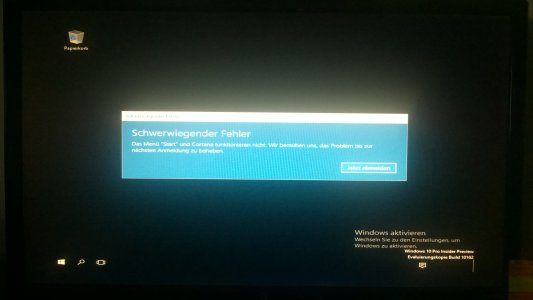
My first try was yesterday and I waited for abou 6 or 7 hours, but then this "one moment" seemed over for me and I pushed the shutdown button on my pc. After a restart it again went into the "one moment please" screen, but just for a minute or less and afterwards another screen appeared, which says " Critical Error - The menu "Start" and "Cortana don't work. We try to fix the problem until your next logon." (I translated it from my german screen). All I could do was clicking on the "logout now" button of the error message. This brought back the "one moment please" screen for a minute and then again the critical error.
I tried to reinstall and now I'm stuck again on the "one moment please" screen. Has anyone had the same problem and can help me? It would be a nightmare for MS, if such a bug occurs with the release version...
Thanks for your help!

I have W10TP on my SP3 since January and now it was the time to install it on my main computer - or so I thought. I downloaded the .iso of build 10162 and installed it via USB stick. No problems during installation, until after the reboot and after asking for a key, which I skipped, it get stuck on a screen which says "one moment please". (In the photo it says "Einen Moment bitte", because I tried to install the german version)
My first try was yesterday and I waited for abou 6 or 7 hours, but then this "one moment" seemed over for me and I pushed the shutdown button on my pc. After a restart it again went into the "one moment please" screen, but just for a minute or less and afterwards another screen appeared, which says " Critical Error - The menu "Start" and "Cortana don't work. We try to fix the problem until your next logon." (I translated it from my german screen). All I could do was clicking on the "logout now" button of the error message. This brought back the "one moment please" screen for a minute and then again the critical error.
I tried to reinstall and now I'm stuck again on the "one moment please" screen. Has anyone had the same problem and can help me? It would be a nightmare for MS, if such a bug occurs with the release version...
Thanks for your help!



 Facebook
 Twitter
 Instagram