Installing apps using data cable still use celluar data connection?

vilnis salenieks

New member
Jan 3, 2013
12
0
0
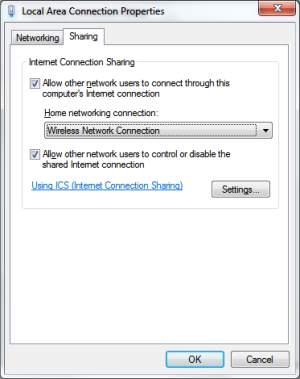
Im using Lumia 920 and Windows XP as my desktop OS (yes it is old, but i still like it:) and there is a thing. I thaught then when I connect phone via cable to PC and install some apps(using PC to navigate store), it will download app using computers data connection and will not use my celluar data connection (logical huh?), but appears that this is not the case.. :( Recently I get suspicious about amount of used data and before installing app through cable I disable phones data connection and app was not be able to get installed.. Really? Is situation different when using Windows 7 or 8 and Windows Phone app?
 
From what you have described you are expecting your phone to use the PC's internet connection but this isn't possible on WP8. It's also known as reverse tethering and if memory serves it was a feature present in some HTC Android phones. Not sure if HTC still include it in their Android phones now though.

When you are installing apps from the Windows Phone Store online you are pushing the apps to your phone via whatever connection mode the phone happens to be in, either 3G or WiFi.
 
In that case I almost dont see point to connect phone to PC to install apps, it is only maybe more convenient to do navigation on PC rather on small phone screen.. this is really frustrating, since I dont have wifi at home
 
I too have Windows XP, but I do have wireless and it works great. Break down and buy it you will love it and save on data. I guess someday we will have to get Windows 8 to keep up.
 
In that case I almost dont see point to connect phone to PC to install apps, it is only maybe more convenient to do navigation on PC rather on small phone screen.. this is really frustrating, since I dont have wifi at home

Connecting your phone to a PC via USB is useful for transferring files between the two and that's it. As the other guy said, get a wireless router and it will make your life a lot easier.
 
Well, if remember corectly on symbian and Nokia suite it was posible to install apps using only computers data connection. Is the same situation on Windows 7 and 8 with Windows Phone app on PC?
 
Symbian and Nokia Suite are not the same as Windows Phone and the Windows Phone App. Nokia Suite would integrate with Nokia Store but it doesn't work like that for Windows Phone. As I said before, the apps are pushed to your device via WiFi or 3G.
 
Yep it would be nice to have. It's the same problem with downloading maps which can only be done via WiFi and no other way.
 
or spend 30 bucks for a cheap Wi-Fi router and join 2013. I find it odd you have the pinnacle of modern technology in your pocket, but have neglected the basics in the home. Nothing wrong with still having XP, but if you have broadband, either the provider or you can add wireless pretty cheaply, then you don't have to worry about data all the time at home. Not to mention it is basic security to have a router with basic firewalling and NAT between you and the internet.
 
well, I dont want to explain reasons for not having those things :D seperate topic for that :) but idea is clear - there is limited usability (I used to with simbian) when you connect WP8 phone to PC via cable
 
but idea is clear - there is limited usability (I used to with simbian) when you connect WP8 phone to PC via cable


That is correct. I rarely ever connect my WP8 to PCs other than app development or sync movie files from PC.

In WP7, you DO get desktop internet pass through via USB connection and Zune software. And if you install app inside Zune software, you are not using phone's data connection at all. But that has been dropped in WP8. In WP8, the usb connection is nothing more than a MPT device for media sync.
 
The message is clear, Buy a Freaking router that's it. How many times you want people to tell you that what you want isn't possible. Buy a router and connect the phone to it. That's the END.
 
The message is clear, Buy a Freaking router that's it. How many times you want people to tell you that what you want isn't possible. Buy a router and connect the phone to it. That's the END.

actually a $15 usb wifi antenna with the hotspot software will do the trick just fine on a PC.
But actually you can browse and install app straight from the PC if you had your phone usb connected and setup properly. However I find this function rather hit and miss.
So, bottom line is, as shown by many replies here, not many people know you can actually install apps directly through pc.
 

Trending Posts

Forum statistics

Threads
343,227
Messages
2,266,308
Members
428,900
Latest member
YeOldRam