Lumia 1520 IE battery lifespan

Ancistrus01

New member
Sep 14, 2014
37
0
0
Hi there!
I have my Lumia 1520 for one month. Everything is perfect but I have problems with battery lifespan when I am using IE. Lots of people says that they can work on their 1520 for two days. I can't. Or I can when I don't use IE. When I started to write this post I had 41% battery. Now I have just 39%. I've written this post for 5 minutes.

Is it normal?
Thank you!
 
Have you checked your background tasks to see what's running?

You want to look into the Battery Saver app and turn off apps that you don't need running in the background.

You haven't mentioned if this is on WiFi or data. If the area you're in has a poor signal or if you have the phone set to 4G and you are not using it, this can drain the battery.
 
I am using just WiFi. In background task i have almost everythink blocked (games and so on).

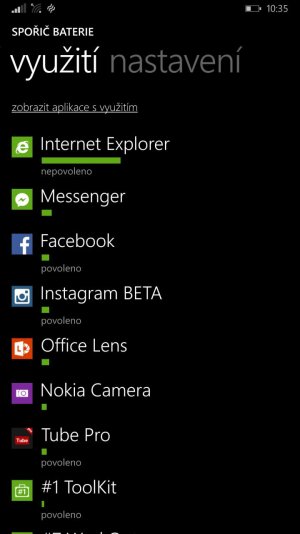
There is screen shot from battery saver.

("Nepovoleno" mean blocked. "Povoleno" mean it can run in background.
 

Attachments

  • wp_ss_20141021_0002.jpg
    wp_ss_20141021_0002.jpg
    58.5 KB · Views: 10
How many apps do you have running in the background? I see four on there at the moment.

For whatever reason I find messaging apps and anything internet related seems to chew through the battery. Maybe someone with a 1520 will have a different opinion but going by my experience with WP, my battery drains the quickest with mobile data and anything data related. That includes using WiFi.

Saying that, you could try doing a soft restart as something may have become 'stuck' running. It does happen occasionally.
 
In the background can run music, calendar, vieather, lockie, OneDrive, battery saver, store, Shazam and Skype.

I did soft reset, so I hope it will be better.
 
I already saw the culprit... It's the FB Messenger app bro. Apps like that and Viber take a heavy toll on the battery life, but at least a day of usage will be provided by our phone's battery life.
 
I had a similar issue, but I think I solved it. Do you have Cortana pinned to your start screen? Every now and then my phone would get crazy hot in the top left corner and drain the battery at like 43%/hour or something insane like that. I removed Cortana from the start screen and that seemed to do the trick, as it hasn't happened in about a month.
 
Have you tried going into the settings applications ie and deleting history?
 

Forum statistics

Threads
342,281
Messages
2,265,359
Members
428,861
Latest member
sixsigma