Moliplayer Pro and upnp dlna media server problems.

FearL0rd

Member
Jun 13, 2012
841
0
16
Hi,
I'm trying to see my media servers with moliplayer on WP and the app is not showing my servers. The Android version works without problems... Anybody in the same situation?


Regards,

Cesar
 
I was one of the first ones to buy this app and now there is no support. They don't answer my messages :(..... They fake functionalities to trick us
 
Fixed turning off ipv6 in the router

Not for me. Been having this issue for over two weeks now. Turning off ipv6 didn't solve it for me.

Already mailed them a couple times, and finally got an answer that didn't really tell me anything. The last update didn't fix it either.

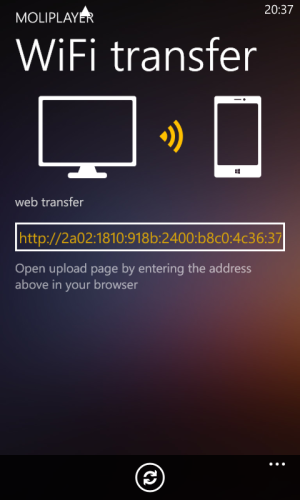
The thing I noticed off the bat was that in Wifi Transfer, Moliplayer suddenly started showing an ipv6 url instead of the usual ipv4 url a couple of weeks ago. At that same exact time dlna also completely stopped working.

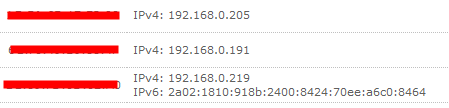
I completely disabled ipv6 in my router and basically in my entire network. Funny thing : only the ip address of the phone is still showing both ipv4 and ipv6 format in the devices list of my router (the bottom one is my phone) :

ipv6.PNG

...which shouldn't be happening simply because ipv6 is completely disabled from MY END. All other connected devices only list an ipv4 ip address.


So logic demands that there really are only TWO possibilities : either Moliplayer still forces ipv6 down our throat, or WP does.
Since the developers aren't being anything less than useless regarding information, both are still up for debate.


Can anyone please confirm they are seeing this ipv6-format url in the Wifi section of their Moliplayer ?

wp_ss_20140222_0001.png

As far as I'm concerned, as long as I'm seeing that url instead of the normal 192.168.0.xxx, this dlna issue won't be resolved. They are definately connected, and this url suddenly being forced in Moliplayer isn?t normal. WHEN I BOUGHT the app, it correctly showed an ipv4 url in Wifi Transfer and everything wireless worked (wifi transfer and upnp/dlna)?So I can confirm that it did actually work flawlessly BEFORE I started seeing that ipv6 url in the Wifi section. Whether they intentionally are forcing ipv6 as of now doesn?t really matter, because EITHER way, it doesn?t work and they need to URGENTLY fix it.

I'm gonna mail them again, including the information provided in this thread. Maybe they'll ultimately start listening.

 
Last edited:
Not for me. Been having this issue for over two weeks now. Turning off ipv6 didn't solve it for me.

Already mailed them a couple times, and finally got an answer that didn't really tell me anything. The last update didn't fix it either.

The thing I noticed off the bat was that in Wifi Transfer, Moliplayer suddenly started showing an ipv6 url instead of the usual ipv4 url a couple of weeks ago. At that same exact time dlna also completely stopped working.

I completely disabled ipv6 in my router and basically in my entire network. Funny thing : only the ip address of the phone is still showing both ipv4 and ipv6 format in the devices list of my router (the bottom one is my phone) :

View attachment 58520

...which shouldn't be happening simply because ipv6 is completely disabled from MY END. All other connected devices only list an ipv4 ip address.


So logic demands that there really are only TWO possibilities : either Moliplayer still forces ipv6 down our throat, or WP does.
Since the developers aren't being anything less than useless regarding information, both are still up for debate.


Can anyone please confirm they are seeing this ipv6-format url in the Wifi section of their Moliplayer ?

View attachment 58522

As far as I'm concerned, as long as I'm seeing that url instead of the normal 192.168.0.xxx, this dlna issue won't be resolved. They are definately connected, and this url suddenly being forced in Moliplayer isn?t normal. WHEN I BOUGHT the app, it correctly showed an ipv4 url in Wifi Transfer and everything wireless worked (wifi transfer and upnp/dlna)?So I can confirm that it did actually work flawlessly BEFORE I started seeing that ipv6 url in the Wifi section. Whether they intentionally are forcing ipv6 as of now doesn?t really matter, because EITHER way, it doesn?t work and they need to URGENTLY fix it.

I'm gonna mail them again, including the information provided in this thread. Maybe they'll ultimately start listening.


Yes it only woks with ip6 and celular data off
 
Yes it only works with ip6 and celular data off

Cellular data doesn't have a play in it at all.
On or off, don't matter. As long as your Wifi is ON, it should work because that is the only connection Moliplayer uses.

Then IPv6, with it OFF, dlna should indeed work, but on or off... -> doesn't matter. It simply doesn't work anymore.

Trialed AND tested, and always fails ;-)
 
Cellular data doesn't have a play in it at all.
On or off, don't matter. As long as your Wifi is ON, it should work because that is the only connection Moliplayer uses.

Then IPv6, with it OFF, dlna should indeed work, but on or off... -> doesn't matter. It simply doesn't work anymore.

Trialed AND tested, and always fails ;-)
TThey need to fix this
 

Forum statistics

Threads
342,177
Messages
2,265,255
Members
428,858
Latest member
thti