MS account exposed on each connect to public hotspots?

Fred P

New member
Jun 21, 2013
110
0
0
hi there, on my lumia i have setup my microsoft login. It is used to sync my photos, email, calender etc & store purchases & probably everything else.
I have disabled all the sync automatically settings, but there are some like calendar and contacts which dont have such a setting.

from what it looks like (i might be wrong), every time you connect to cellular internet or wifi, the phone will authenticate with outlook and skydrive.

my concern is when i am abroad, at a unfamiliar airport etc, there is a higher risk of connecting to a bogus wifi hotspot.
Even if all i am doing is surfing the news, and am avoiding online banking, this ms syncing could expose the most important bit of info on my phone, the microsoft login.

Is there any way to control this (like the way the certificate store in the desktop IE will ask you for permission before accessing a certificate?)
Thanks
F
 
In general, yes, the fact that you have a handset with MS branding is exposed no matter what network connection you make. Same for any device, tablet, note/netbook etc.
Account information, aka passwords, account details etc is a completely separate matter. Those are NOT exposed and if a connection has to be made to the MS servers, those connections are strongly encrypted.
 
Actually nothing is safe if you considering the possibility that someone will and can tap into your communication. Even at your home or the place you think its safe, you are still at risk. After all your phone is sending out a signal that can be intercepted, same goes to the tower response. From what you described, you need signal encryption, which is far beyond daily used affordability.

Oh BTW, you do have the option to turn off sync. Email has an manual refresh, calendar can be turn off individually for each account, people hub can turn off all social sync including outlook. And these pretty much sums up all the auto sync in WP.
 
Why buy smartphone and usable everything? :) All communications with MS servers are encrypted as Jazmac said. As about mails, most email servers allows to use SSL so it's encrypted here too. I don't understand what are you worring about.
 
its good to know that there is a form of encryption. but marketing director for The Wi-Fi Alliance said:
"I just tell people not to do anything at a coffee shop that they wouldn't write on the back of a postcard,"
The details to log in to my microsoft account (even in hashed form) are not something i would write on a postcard.

my question remains: is there a way to stop this automatic login / and the sync of contacts& calendar? i found the checkbox to stop email sync. & photo sync, but not one for calendar or contacts.
i think disabling this sort of syncing is the safest way to browse with unkown wifi hotspots. even if i unknowingly connected to a hackers laptop masquerading as the cafe's wifi hotspot
if all i did was read the news and check the weather, he couldnt get any usable info off me.


i thought of a solution & did a test. i went into email+accounts and changed by ms account password to xyz so it wouldnt be able to sync. i powered phone off and on & it still synced!!. as soon as i touched a calender entry it instantly was updated on the live.com calendar! what am i doing wrong here?

thanks


all these articles , including this government one says there is a risk (this is not specific to windows, but i cant find where to disable syncing)
Tips for Using Public Wi-Fi Networks | OnGuard Online
Is It Safe To Bank On Public Wi-Fi? How Not To Get Hacked!
5 Traps: How do I use public Wi-Fi safely? - Red Tape
 
its good to know that there is a form of encryption. but marketing director for The Wi-Fi Alliance said:
"I just tell people not to do anything at a coffee shop that they wouldn't write on the back of a postcard,"
The details to log in to my microsoft account (even in hashed form) are not something i would write on a postcard.

my question remains: is there a way to stop this automatic login / and the sync of contacts& calendar? i found the checkbox to stop email sync. & photo sync, but not one for calendar or contacts.
i think disabling this sort of syncing is the safest way to browse with unkown wifi hotspots. even if i unknowingly connected to a hackers laptop masquerading as the cafe's wifi hotspot
if all i did was read the news and check the weather, he couldnt get any usable info off me.


i thought of a solution & did a test. i went into email+accounts and changed by ms account password to xyz so it wouldnt be able to sync. i powered phone off and on & it still synced!!. as soon as i touched a calender entry it instantly was updated on the live.com calendar! what am i doing wrong here?

thanks


all these articles , including this government one says there is a risk (this is not specific to windows, but i cant find where to disable syncing)
Tips for Using Public Wi-Fi Networks | OnGuard Online
Is It Safe To Bank On Public Wi-Fi? How Not To Get Hacked!
5 Traps: How do I use public Wi-Fi safely? - Red Tape

as I replied, yes there is, both for risk and a way to stop sync them. The stop sync option is not obvious and not at one place. But here's the tip. Ever seen those 3 dots at the down right corner of each app? Explore that and you will find ways to turn them off.
 
its good to know that there is a form of encryption. but marketing director for The Wi-Fi Alliance said:
"I just tell people not to do anything at a coffee shop that they wouldn't write on the back of a postcard,"
The details to log in to my microsoft account (even in hashed form) are not something i would write on a postcard.

my question remains: is there a way to stop this automatic login / and the sync of contacts& calendar? i found the checkbox to stop email sync. & photo sync, but not one for calendar or contacts.
i think disabling this sort of syncing is the safest way to browse with unkown wifi hotspots. even if i unknowingly connected to a hackers laptop masquerading as the cafe's wifi hotspot
if all i did was read the news and check the weather, he couldnt get any usable info off me.


i thought of a solution & did a test. i went into email+accounts and changed by ms account password to xyz so it wouldnt be able to sync. i powered phone off and on & it still synced!!. as soon as i touched a calender entry it instantly was updated on the live.com calendar! what am i doing wrong here?

thanks


all these articles , including this government one says there is a risk (this is not specific to windows, but i cant find where to disable syncing)
Tips for Using Public Wi-Fi Networks | OnGuard Online
Is It Safe To Bank On Public Wi-Fi? How Not To Get Hacked!
5 Traps: How do I use public Wi-Fi safely? - Red Tape

I would write the encrypted version of my username and password on a postcard. If you know anything about encryption, you would know it's perfectly safe.

Microsoft always uses the most secure forms of encryption. No matter what, no one could decrypt the communication except for Microsoft. Guaranteed. No need to worry about it.
 
i think i wrote a legitimate question, how to disable sync when you are not on a known trusted wifi hotspot (like at work or at home) when all i need to do is browse cnn or check the weather. if someone comes across a solution, we can all learn from it.

Robert, can you please tell me, were you part of the team who developed the encryption used on the WP8 phone?
Can you please explain, this time please elaborate (please dont be afraid to get technical & show us your knowledge ),
how a WP8 handles this situation

Man in the Middle Attack -Kaspersky Daily
"However, each of these defenses has limitations and there have been demonstrations of practical attacks such as SSLStrip or SSLSniff that can negate the security of SSL connections."
 
"Ever seen those 3 dots at the down right corner of each app? Explore that and you will find ways to turn them off"

I went through those settings systematically. I found this MVP post for windows 7 but wanted to check here if someones knows of perhaps a new setting for windows 8.

Disable synchronizing contacts Windows Live - Microsoft Community
MVP
You cannot turn off contact and calendar sync for the primary Microsoft account
 
i think i wrote a legitimate question, how to disable sync when you are not on a known trusted wifi hotspot (like at work or at home) when all i need to do is browse cnn or check the weather. if someone comes across a solution, we can all learn from it.

Robert, can you please tell me, were you part of the team who developed the encryption used on the WP8 phone?
Can you please explain, this time please elaborate (please dont be afraid to get technical & show us your knowledge ),
how a WP8 handles this situation

Man in the Middle Attack -Kaspersky Daily
"However, each of these defenses has limitations and there have been demonstrations of practical attacks such as SSLStrip or SSLSniff that can negate the security of SSL connections."

On the other end, users can protect themselves against some kinds of MITM attacks by never connecting to open WiFi routers or by employing a browser plug-in such as HTTPS Everywhere or ForceTLS that always establishes a secure connection whenever the option is available. However, each of these defenses has limitations and there have been demonstrations of practical attacks such as SSLStrip or SSLSniff that can negate the security of SSL connections.
Your answer is bolded. No network is completely secure that connects to the internet. It's life.
 
I understand your concern to a limited extent. But it is like buying a 5 star safety rated vehicle (SSL) and then asking if you can sit in your car and not drive it anywhere on public roads. You always risk data interception, theft, hacking, and spoofing when ever you go on the internet. Taking best practice precautions, such as using SSLv2 when able, using complex passwords and changing them regularly, and not using the same password for multiple accounts are your only real measures to reduce risk. It is not as easy to get info from SSL as people like to say it is, even with a man in the middle attack.
You can also just pay for some extra data and not use an open hotspot.

Besides, if anything happens, you can just ask the NSA to help out, I'm sure they have a record of who took your data. :-P
 
i think i wrote a legitimate question, how to disable sync when you are not on a known trusted wifi hotspot (like at work or at home) when all i need to do is browse cnn or check the weather. if someone comes across a solution, we can all learn from it.

Robert, can you please tell me, were you part of the team who developed the encryption used on the WP8 phone?
Can you please explain, this time please elaborate (please dont be afraid to get technical & show us your knowledge ),
how a WP8 handles this situation

Man in the Middle Attack -Kaspersky Daily
"However, each of these defenses has limitations and there have been demonstrations of practical attacks such as SSLStrip or SSLSniff that can negate the security of SSL connections."

No, I am not part of the team. However, I myself am a developer. I have used encryption technologies myself such as RSA encryption. RSA is not susceptible to man-in-the-middle attacks. It's impossible for that to happen with RSA. I'd have to imagine that if a developer like me can use a secure encryption like RSA to protect my data, a company like Microsoft should be able to secure there communications just as much, if not more.

Microsoft uses SSL primarily, but it's also possible to use multiple encryptions. Underneath the SSL can be RSA, Kerberos, RC4, and multiple other types of encryption. Unless Microsoft publically states what they use, we will never know. It comes down to a matter of trust. Knowing what myself is capable of, I know that Microsoft is capable of much more. So therefore, I trust Microsoft.

Just to give you an idea of how secure RSA is, there is a national award of over 1 million dollars to anyone who cracks it. If it was able to be done, someone would have already claimed that reward by now.
 
You've all got very valid points - no network anywhere is safe. Ask the NSA. But I don't think that what the OP is asking is unreasonable. He wants to know if there is a way to keep his phone from syncing the Microsoft account. AFAIK, the only way is to put it in airplane mode. If there's another way, I'd like to hear it as well.
 
You've all got very valid points - no network anywhere is safe. Ask the NSA. But I don't think that what the OP is asking is unreasonable. He wants to know if there is a way to keep his phone from syncing the Microsoft account. AFAIK, the only way is to put it in airplane mode. If there's another way, I'd like to hear it as well.

But if he puts it in airplane mode, then he won't be able to surf the internet. I think the best solution is to just use the Data plan data and not connect to wifi at unknown locations.
 
"Just to give you an idea of how secure RSA is, there is a national award of over 1 million dollars to anyone who cracks it. If it was able to be done, someone would have already claimed that reward by now."

You cant claim the reward.

RSA withdrew the challenge following recent developments in hardware.
The prize is no longer available.

btw

https://forums.windowscentral.com/e...2Fwww.microsoft.com%2Fen-us%2F&token=OS4R9Fky
"Wi-Fi: 8 tips for working securely from wireless hot spots
Public hot spots all have one thing in common—they are open networks that are vulnerable to security breaches. Because they do not encrypt data, your passwords, email messages, and other information can be visible to hackers. That means it's up to you to be aware of wireless hot spot security and to protect the data on your PC or mobile device. When you’re not at home or at work, it’s a good idea to turn off your laptop or notebook’s Wi-Fi capability when you’re not using it. Otherwise your computer might connect to a malicious hot spot without your realizing it...a password-protected site, such as Windows Live SkyDrive, and access it only when necessary. "
 
Last edited:
"Ever seen those 3 dots at the down right corner of each app? Explore that and you will find ways to turn them off"

I went through those settings systematically. I found this MVP post for windows 7 but wanted to check here if someones knows of perhaps a new setting for windows 8.

Disable synchronizing contacts Windows Live - Microsoft Community
MVP
You cannot turn off contact and calendar sync for the primary Microsoft account
Yes you can. For Calender, you may go into 3dots, settings and turn off each sync. Likewise for people hub, 3dots, settings, filter contact. But then you will lose all contacts unless you have them save on the sim card. The only thing you cannot shutdown completely is the photo hub, which basically tap into your skydrive permanently ever since you setup your MS account. But if you doesnt go into the album it doesnt sync, so you still can remain offline from MS servers. Like i said, it is not obvious and the tip is pretty clear if you actually tried to go into the 3dots.
 
But if he puts it in airplane mode, then he won't be able to surf the internet. I think the best solution is to just use the Data plan data and not connect to wifi at unknown locations.
Yes, I do understand that. But the question was how to prevent syncing with Microsoft. AFAIK this is the only way to completely prevent syncing with any of the Microsoft services. No, it's not ideal - or even desirable - it turns your smart phone into a feature phone that can play some games, but it does prevent syncing with MS services.
 
Yes you can. For Calender, you may go into 3dots, settings and turn off each sync. Likewise for people hub, 3dots, settings, filter contact. But then you will lose all contacts unless you have them save on the sim card. The only thing you cannot shutdown completely is the photo hub, which basically tap into your skydrive permanently ever since you setup your MS account. But if you doesnt go into the album it doesnt sync, so you still can remain offline from MS servers. Like i said, it is not obvious and the tip is pretty clear if you actually tried to go into the 3dots.

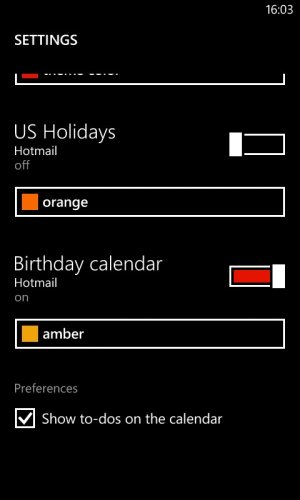
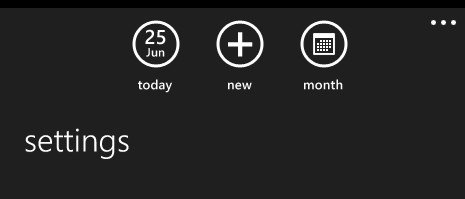
i have attached screenshots of what i see when i click the 3 dots from calendar,i have no sync settings. Filter contacts doesnt prevent search on mine, it just hides the contact entries on my phone (to hide them from my kids?) . Strangley, my photos hub is one of the few places where it shows a setting that can be used to disable auto upload.

awp_Setting_cal.jpgacal_setting1.jpg

Do we have the same version of WP8? Do you have the Amber/GDR2 release on yours?
 

Trending Posts

Forum statistics

Threads
343,251
Messages
2,266,332
Members
428,902
Latest member
niedrie