
Music App...Y U NO LOOK LIKE this...

X0LARIUM

New member
Aug 11, 2012
1,799
0
0
Ok friends,

I am in a bit of a problem again. I have a very cool Windows 8 desktop PC and I am very happy.

But there is one small issue. No a big one actually. WHY DOES MY MUSIC APP look like this?
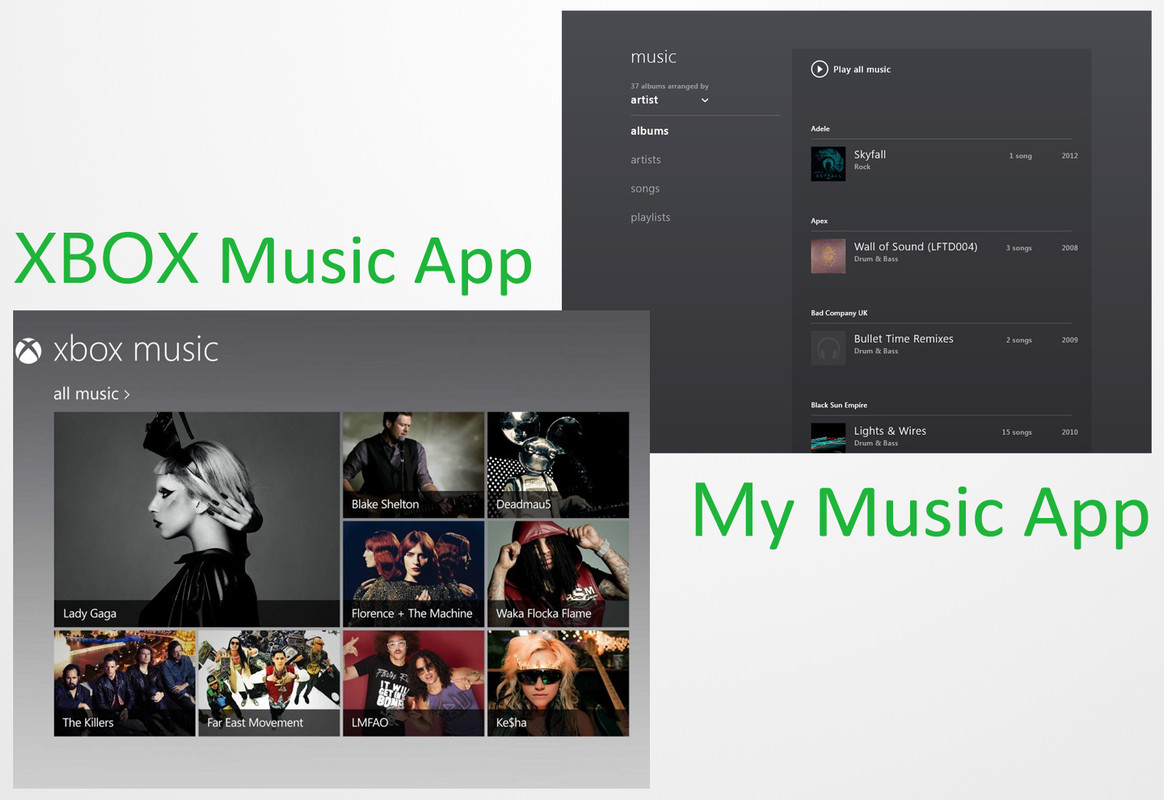
MUSIC.jpg


The on the right is mine and the one on the left is how it is supposed to be right??


I downloaded the Music App from the Store.

I am on:
x64 Windows 8 Enterprise N Edition.
 
I think in ur settings of the music app, preferences, u have it defaulting to library view, try to swipe over to charms, settings, prefs, and change it

Sent from my SCH-I535 using Tapatalk 2
 
That's odd, I have like 7 options.

Ps: how do you screenshots?? Lol

EDIT: nvm your on desktop ��
 
Hmm..what version of Windows is that..out of the plethora of them...

Mine is x64, Enterprise N edition...


Sent from my RaZr HD.
 
I might add, the app didn't come with the OS. Just downloaded it yesterday...if that helps.

Sent from my RaZr HD.
 
My music app looks just like the Xbox one. I am using Windows 8 Pro. I didn't have to download a Music app though. Maybe it's because you're using Enterprise edition? In the attachments I added you can see that I get your default screen when I click on my music, but I can go back through the back arrow right next to the title.
 
My music app looks just like the Xbox one. I am using Windows 8 Pro. I didn't have to download a Music app though. Maybe it's because you're using Enterprise edition? In the attachments I added you can see that I get your default screen when I click on my music, but I can go back through the back arrow right next to the title.

Thanks for the screenies mate...I too think Enterprise N is the culprit...

Could u all do me a favour and check the version available...?

I will share mine too:

MUSE_2.png


Sent from my RaZr HD.
 
Last edited:
I have nothing in my music. I am still trying to figure out how to add my network server music storage to my music. Keeps telling me its lonely. I have my music server folder added to the music library so not sure why its not showing up. I did click on Adele in the feature tile and it allowed me to add to my music because I have that album on my server. I tried a different artist I did not have and that option was not available. So I am confused. I surely don't want to have to manually click through every artist somehow to add to my music.
 
I have nothing in my music. I am still trying to figure out how to add my network server music storage to my music. Keeps telling me its lonely. I have my music server folder added to the music library so not sure why its not showing up. I did click on Adele in the feature tile and it allowed me to add to my music because I have that album on my server. I tried a different artist I did not have and that option was not available. So I am confused. I surely don't want to have to manually click through every artist somehow to add to my music.

Right click Music under Libraries.
w
Properties>Add (add your folder here)

Just make sure while you do this, you don't have your Music App open.

Once you are done adding it, start the Music App. All your music, in one place. Enjoy.
 
You have the 'N' edition. That's the EU mandated non media version. That's why you had to download the app from the store and wasn't included in the OS. Thus no Xbox Music. Also, your country may not currently be supported by the Xbox Music store.


Oh...ok, thanks. But strangely, the Music App when I got it from the store, in the screenshot has 'XBOX Music'...

Anyways, thanks.
 
Oh...ok, thanks. But strangely, the Music App when I got it from the store, in the screenshot has 'XBOX Music'...

Anyways, thanks.

Cheers! Try getting the regular version. The N edition may not even have WMP included.
 

Members online

Forum statistics

Threads
341,185
Messages
2,264,250
Members
428,832
Latest member
yusuf22345
