Problems with the Native music app on WP8

Snow

New member
Aug 28, 2011
86
0
0
i just sync my music using the new zune replacement for wp8 and found that most of my music albums thumbnail pictures are missing on the music app on wp8?? In the past when i sync with zune all the album pictures are there, even those pictures that i added manually to the album. Now say i have 200 songs, 150 songs are blank with no thumbnail pic and its ugly. Any fix? Also is it just me or the music app on wp8 lags?
 
The way I do it is using mp3tag. Make sure that the "album" field isn't blank and add an album cover if there is none. I then add my music to iTunes and make playlists and such if wanted. Finally I sync my iTunes with my phone using Windows Phone Desktop app. Voila!
 
The way I do it is using mp3tag. Make sure that the "album" field isn't blank and add an album cover if there is none. I then add my music to iTunes and make playlists and such if wanted. Finally I sync my iTunes with my phone using Windows Phone Desktop app. Voila!
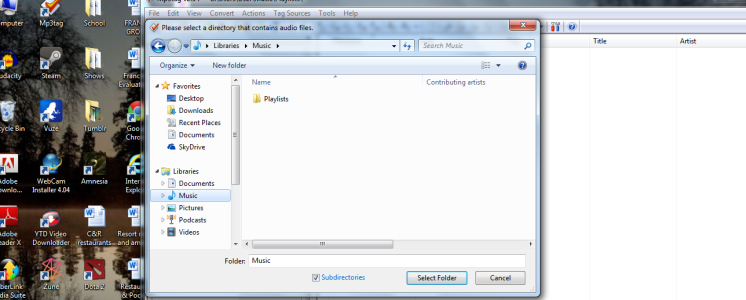
i tried installing mp3tag and when i click add directory, i went to my music directory but there isnt any music listed to click? Though in realty i have tons of music in my music folder. Any solution?
 

Attachments

  • sas.png
    sas.png
    375.5 KB · Views: 2
I tried using the app that auto install by ticking sync all. Not all of my album art came even though in zune, all of the album art are present. Then i try highlighting all and copying and paste from my music directory to the phone directory. failed too
 
i tried installing mp3tag and when i click add directory, i went to my music directory but there isnt any music listed to click? Though in realty i have tons of music in my music folder. Any solution?
Thats strange. Try copying your music to a separate map.
 
I synched my 8X with Windows media player and used the find album info option to get the album art, Try that. I also get zero lag in the music player or at least not anymore than what I got on WP7.
 
I synched my 8X with Windows media player and used the find album info option to get the album art, Try that. I also get zero lag in the music player or at least not anymore than what I got on WP7.
how do you sync with windows media player? Also idk why I have the lag. It occur sometimes, like a 1 second delay after clicking.
 
how do you sync with windows media player? Also idk why I have the lag. It occur sometimes, like a 1 second delay after clicking.

Open windows media player, add songs to your library if you haven't already done that then press the sync tab and drag/drop songs into the sync tab. Make sure your phone is selected first tho.
 
this may sound like a dumb question. but how do you add songs to your library lol! Also i added songs to the sync tab but when i connected my phone to the com, the windows media player did not locate any device
 

Trending Posts

Forum statistics

Threads
343,240
Messages
2,266,321
Members
428,900
Latest member
YeOldRam