Specific Website Help!

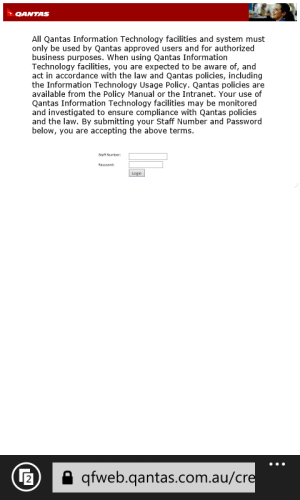
it is displaying a partially cropped page when opened.I was able to see the login panel on the page.
 
site is not properly configured for IE then .. sad .. we have quite some number of sites which won't work well on IE .. bad website coding
 
this is all I get when I get it.....no log in page :-( Really annoying as it's how I get my work rosters on the go!

wp_ss_20130801_0001.jpg
 
no tablet :-( how came crash can see the log in panel yet i can't?

Does one of you have it configured for desktop view and one for mobile? Do not track requests? Cookies? Allowing sites to store files? Could be that the two of you have different settings for any of those which could affect the loading of a page.
 
I've tried movbile and desktop, still getting the same, and tried a combination of others settings with no luck!
 
@Guy Adams, open it from Desktop and use the Compatibility View. It is ok that way, it's Navitaire system.

ps.

We don't have that option in WP8.
 
I hate to break your heart, but I was able to open it with my Lumia 610...
 
It works fine on my laptop (MacBook Pro sshhhhhhh) and works in Safari, Chrome, Opera etc..... what is compatibility view?
 
It works fine on my laptop (MacBook Pro sshhhhhhh) and works in Safari, Chrome, Opera etc..... what is compatibility view?

If you're using Windows 8, the Desktop browser has compatibility view, which is turned on by clicking on the torn page icon near the address box.
 
On my Lumia 610

8azu3unu.jpg


Sent from my LT25i using Tapatalk 4 Beta
 
If some people are able to get it on their phones, it's not IE 10. It's configuration. Problem is that it isn't very specific as to what the problem is.
 

Trending Posts

Forum statistics

Threads
343,235
Messages
2,266,316
Members
428,900
Latest member
YeOldRam