
Static IP in Wi Fi Settings

TechFreak1

Active member
May 15, 2013
4,627
21
38
Those of you who are running the preview on supported / unsupported phones confirm if you have the static IP setting for Wi Fi.

It is beyond mind bogglingly bizzare it is available in certain regions... on wp 8.x (certain models had it in 8.0...). I had to reconfigure my entire network setup just because of this idiotic omission lol :grincry::grincry::grincry::grincry::grincry::grincry: (don't have it on my 920 - Build 14219.341 - Pfd).
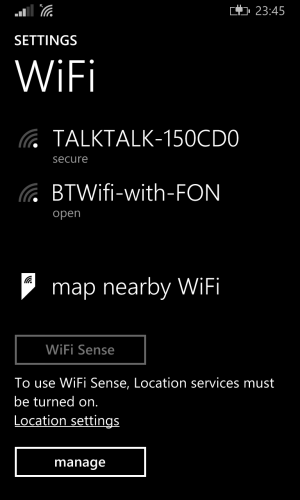
wp_ss_20150218_0004.png
 
I wouldn't go so far as to call it an idiotic omission. There can't be that many folk set a static IP on their phones. And anyone that really wanted to would just use a DHCP reservation. Curious I am, what's the use-case for static IP on phone?
 
It is idiotic that this has been more or less a standard feature for smartphones for aeons. Not to mention it is a must have feature for advanced users. My network initially consisted of two switches, two wireless access points, host router and several homeplugs. Setting a address reservation via dhcp was not an option. It was easier to simplify (I foresaw the increased use of laptops and tablets in the house - everything was wired) as opposed to get rid of a phone which I had just bought for ?500.
 
I still can't see why you wouldn't run a dhcp to cover friends connecting or use of random kit. Just give it an address range outside of that which you use for fixed devices.

I only use fixed IPs at home for infrastructure. Everything else is dhcp (with some reservations).
 
I think you didn't get what I said, "setting A address reservation via dhcp". I say it wasn't an option because the damn phone wouldn't connect to the internet when connected to the third access point (separate ssid) and turning dhcp for that would conflict with the host (I had two dhcp pools with different ranges on the host).

People could still connect via dhcp and once connected they would be given an ip from the first pool (happened by default).

So I ended up re-configuring everything to use one ip range.

Edit:
Now that I have explained why I find that omission idiotic, if the most people knew you could actually get a certain version of netflix using certain dns addresses then I imagine most people wouldn't be so quick to dismiss it as a redundant feature.:winktongue:
 
Last edited:
I understand your issue with DHCP now, though I can't help thinking there's a way round that without resorting to fixed ips. It's just that working it through would require rolling up sleeves and getting stuck in which I can't do from here, of course.

I would love to know what certain dns servers you might be using there. Purely for research purposes, you understand...
 
I understand your issue with DHCP now, though I can't help thinking there's a way round that without resorting to fixed ips. It's just that working it through would require rolling up sleeves and getting stuck in which I can't do from here, of course.

I would love to know what certain dns servers you might be using there. Purely for research purposes, you understand...

1) In the end it has sort-of-panned out as moved to Sky due to an unrefuseable offer (they only offered such a deal to O2 customers during the transition period - Sky bought O2's home broadband division) and using your own router violates their TOS. The offer expires August this year, so will be moving providers near the time as the same package will become prohibitively expensive.

2) Of course, I can't recall them from top of my head (as I no longer have a netflix sub) however you can actually do a quick bing search :winktongue:.
 

Members online

Forum statistics

Threads
341,307
Messages
2,264,374
Members
428,832
Latest member
hosseinf
