Subcribe to private iCal

engineermoore

New member
Oct 11, 2013
106
0
0
Hi, I am trying to add a private iCal to my calander (Hotmail) but I can't work out how to do it. it comes in the format "https://frontdoor.xxx.xxx.xx.xx/xxxxxxx/download/xxxtimetable.ics" (the x's are there to protect my privacy) after which I am expected to log in using my credentials. Does anyone know any way I can add this to my Hotmail calendar using outlook.com, outlook 2013 or windows phones 8 or of any possible workarounds? thanks for your help.
 
Hi, I am trying to add a private iCal to my calander (Hotmail) but I can't work out how to do it. it comes in the format "https://frontdoor.xxx.xxx.xx.xx/xxxxxxx/download/xxxtimetable.ics" (the x's are there to protect my privacy) after which I am expected to log in using my credentials. Does anyone know any way I can add this to my Hotmail calendar using outlook.com, outlook 2013 or windows phones 8 or of any possible workarounds? thanks for your help.

Go to calendar.live.com, and up the top in the bar there is an option called import. Click that, and on the sidebar on the left click Subscribe - paste in the .ics URL, click save and it should be sweet!!
 
Thanks, but I've already tried that. But it Doesn't work as it is a private calander. Outlook.com suggests making it public but obviously i don't have that option :)
 
Thanks, but I've already tried that. But it Doesn't work as it is a private calander. Outlook.com suggests making it public but obviously i don't have that option :)

Have you made sure that the iCal link you are using is indeed a private address?
 
yeah, the intranet page I was sent has these instructions
"Point your calendar application to https://frontdoor.xxx.xxx.xx.xx/xxxxxxx/download/xxxtimetable.ics
Specify your ID and password.
Refresh no more than every 5 minutes. "

Outlook.com gives this message when I try to subscribe to the URL
"it looks like this is a private calendar and you don't have permission to view it. The owner will need to make this calendar public before you can subscribe to it"

and IT are taking the "well it works on iPhones" route.
 
yeah, the intranet page I was sent has these instructions
"Point your calendar application to https://frontdoor.xxx.xxx.xx.xx/xxxxxxx/download/xxxtimetable.ics
Specify your ID and password.
Refresh no more than every 5 minutes. "

Outlook.com gives this message when I try to subscribe to the URL
"it looks like this is a private calendar and you don't have permission to view it. The owner will need to make this calendar public before you can subscribe to it"

and IT are taking the "well it works on iPhones" route.

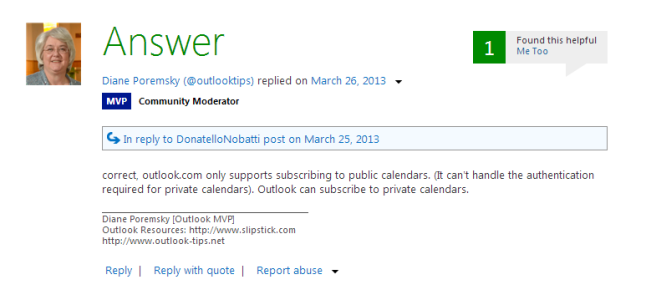
The funny thing is that when I was on iOS there was no way to add calendars by URL to the native calendar app....and in regard to your problem I found an (unfortunate) answer:Capture.PNG
 

Trending Posts

Forum statistics

Threads
343,239
Messages
2,266,320
Members
428,900
Latest member
YeOldRam