Weather app

rishabk97

New member
Nov 4, 2013
156
0
0
Hello,

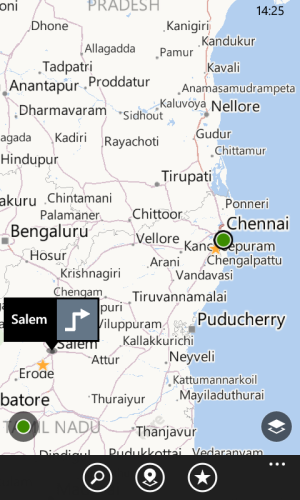
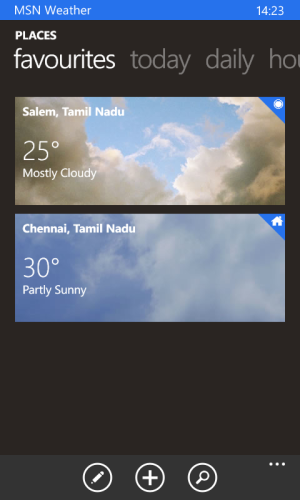
I'm having this problem since a year now. Please take a look at the screenshots below:
wp_ss_20151127_0002.pngwp_ss_20151127_0003.png

The Weather app shows my location some 250 kms away from my present position. I believe that this problem is only around a particular radius around my home. Because, if I travel to some other place, it updates just fine, but whenever I return to my place, it just stays stuck at the previously updated location. I don't know if I've elaborated my statement well, please suggest some answers.

Thank you.
 
Are you indoors or outdoors when the app tries to determine your location?

Try stepping outside and try to let the app determine your location.

If your indoors, your phone can't use GPS so it resorts to at least two other methods: cellular triangulation or ip-address-based locations. There's a chance that the determined location will be wrong if, for example, one of the cellular towers has a wrong assignment or if your router or modem has a wrong ip-address assignment.
 
I'm indoors but the location is accurate 69m. I think this accuracy is more than enough.

Now since you suggested, I tried stepping out and couldn't get any better results. I am sure that this problem only exists on my device in my locality. Do you have any idea why, by chance?
 
Have you tried deleting those locations from the weather app, or reinstalling the app? I got a similar bug before, but the location anomaly wasn't as far as yours.
 
I've reinstalled it multiple times in the past. I'll give it one more shot and let you know.

Thank you.
 
After the reinstall, it is not showing the Weather of my current location, but only of Home location.
 
Yes, that's correct.

So, just to clarify: the weather app is not showing "Current Location" but only "Home Location", but your "Home Location" is your actual current location, right? If so, then that's normal. Once you move to another location, you should see "Current Location" displayed already. It seems that, by default, the first location the weather app identifies becomes labelled as the Home Location. But when you move to another location, all other succeeding locations will be shown under Current Location. Once that happens, you should be able to choose which of those locations will be your new Home Location.
 
the weather app is not showing "Current Location" but only "Home Location", but your "Home Location" is your actual current location, right?
Not like that, it catches my current location correctly when I'm outside "Chennai, India". It doesn't recognizes my current location when I am actually at "Chennai, India".

It used to work fine before, the way it should have worked, with the location icon overlapped on the home icon.
 
I'm in Windows 10 Mobile now, so I can't remember if it is possible to delete the "Home Location". Try that next time you're in Chennai.
 
While you're in Chennai, delete "Chennai" and observe if "Salem" changes to "Chennai" - that is what I'm trying to say.
 

Trending Posts

Forum statistics

Threads
342,484
Messages
2,265,566
Members
428,871
Latest member
breadcat