
Who's using the extra tiles??
- Thread starter Meagey
- Start date
You are using an out of date browser. It may not display this or other websites correctly.
You should upgrade or use an alternative browser.
You should upgrade or use an alternative browser.

Laura Knotek
Retired Moderator
- Mar 31, 2012
- 29,451
- 63
- 48
Same here. I like the extra tiles on my 920, even though I use a lot of small tiles.I have a Lumia 920 and I'm using the extra tiles. Small apps are now really small, but it works fine for me. The main reason I have chosen for this is the design options. It adds something extra to my start screen. I always found two rows too small. Large tiles took the whole width of the screen. With the extra row I can add more creativeness in the design of my homescreen without risking that it looks 'a bit boring'.

officially_juju
New member
- Apr 7, 2014
- 40
- 0
- 0
I tried it for a few hours but went back to the normal layout. With a bigger screen it would be a no-brainer for me but on my 925 the little tiles didn't look right.


Reui
New member
- Sep 5, 2012
- 99
- 0
- 0
I'm loving the extra tiles. I use the smallest tiles for the less informative apps but is always in used, medium for nice looking icons and where Notif count is a must, large tiles for messaging and emails. 3 Medium tiles lined up in a row looks pretty too. I feel much organized now that I see all tiles in one glance.

metalchick719
New member
- Oct 4, 2012
- 2,353
- 1
- 0
I have a question as someone who is waiting for the official 8.1 release instead of updating via the developer preview... Is it possible to go back to the normal amount of rows in tiles after you've used the extra ones? I'm afraid I'll probably find the extra tiles too odd.
I have a question as someone who is waiting for the official 8.1 release instead of updating via the developer preview... Is it possible to go back to the normal amount of rows in tiles after you've used the extra ones? I'm afraid I'll probably find the extra tiles too odd.
Yeah, the feature is a simple toggle switch.

I have a question as someone who is waiting for the official 8.1 release instead of updating via the developer preview... Is it possible to go back to the normal amount of rows in tiles after you've used the extra ones? I'm afraid I'll probably find the extra tiles too odd.
Yeah, you can toggle it on and off as much as your heart desires.

RumoredNow
New member
- Nov 12, 2012
- 18,134
- 1
- 0
I've been using the extra tile column and the background a few days now...
Everything is smaller, but not so bad that the 1x1 isn't usable or text can't be read. I'm a bit older and use "cheaters" for dedicated reading time. The 925 has great clarity and the screen resolution is pretty high at 332ppi. I can see what I need to see without my reading glasses. I haven't missed a tile yet and opened a neighboring one by mistake.
My verdict: I love it. One of the strengths of Windows Phone that I always espouse is how the tiles put the things that you use right out front for quick access and the live tiles bring so much info to you at a glance. It's more of what I love about the OS so how could I not embrace it.
I'd say anyone with a 4.5" or higher screen that is pushing a lot of ppi should definitely take a few days to get used to it before deciding if the new layout is right for them.
Everything is smaller, but not so bad that the 1x1 isn't usable or text can't be read. I'm a bit older and use "cheaters" for dedicated reading time. The 925 has great clarity and the screen resolution is pretty high at 332ppi. I can see what I need to see without my reading glasses. I haven't missed a tile yet and opened a neighboring one by mistake.
My verdict: I love it. One of the strengths of Windows Phone that I always espouse is how the tiles put the things that you use right out front for quick access and the live tiles bring so much info to you at a glance. It's more of what I love about the OS so how could I not embrace it.
I'd say anyone with a 4.5" or higher screen that is pushing a lot of ppi should definitely take a few days to get used to it before deciding if the new layout is right for them.

waazzupppp
New member
- Sep 28, 2009
- 512
- 0
- 0
I did it on the 8x and now my 925... So far, the tiles are perfect for the things I want a count on, but don't need a name on... They really remind me of my old 'BlackBerry' Themed icons. The little tiny ones on the Today screen that got the little red * over them when something new came in. I like it since I really just want to see when something new comes in but don't need to know what it is.
Currently I have a row of 6 emails - which I tried the linked inbox feature with, but didn't like - so small tiles are great... A row of games... and a row of websites...
All of which take up way less space, but I still have one click access to them! It's a perfect solution!
Currently I have a row of 6 emails - which I tried the linked inbox feature with, but didn't like - so small tiles are great... A row of games... and a row of websites...
All of which take up way less space, but I still have one click access to them! It's a perfect solution!
RumoredNow
New member
- Nov 12, 2012
- 18,134
- 1
- 0
I used Cortana to find my background pic. I asked her for "red leaves" and this was the images result I picked:

I've tried to make this screencap of my tile layout as close to life-sized as I could:
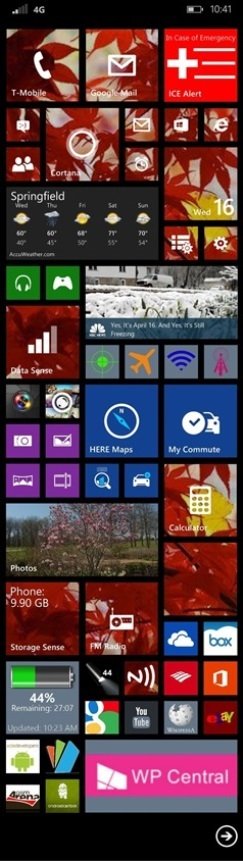
<edit> Sorry about the size. The original on my screen looks exact. Either my host or this forum is resizing the upload.
I've tried to make this screencap of my tile layout as close to life-sized as I could:
<edit> Sorry about the size. The original on my screen looks exact. Either my host or this forum is resizing the upload.

HoosierDaddy
Well-known member
- May 28, 2013
- 2,352
- 116
- 63
You can switch back and forth. Of course when switching to 3 columns you will have to fill the new blank column with what you want. And when you switch back to 2 columns, the things in the 3rd will have to go somewhere so check into what it does with them (add them to the bottom of the other columns or ???). So as you can see, you can't just jump back and forth instantaneously because of the arranging that has to be done either way.I have a question as someone who is waiting for the official 8.1 release instead of updating via the developer preview... Is it possible to go back to the normal amount of rows in tiles after you've used the extra ones? I'm afraid I'll probably find the extra tiles too odd.


JimWPan
New member
- Mar 15, 2014
- 38
- 0
- 0
I have multiple live tiles for many eMails and exchange eMails. The backgound make it reading difficult, I turned it off. The extra tiles make everthing small, not useful unless you're running phatablet. Folder option is nice, cortana was ok as my personal opionon.

Paedin
New member
- Jun 22, 2013
- 126
- 0
- 0
Ive always not like the scrolling start screen so I kept my icons to just one screen. I like the ability to now have more of what I want and to have facebook and photo hub as large tiles to utilize the live tile features. Wont ever get turned off back to normal 2 column mode.

SatinSpellbinder
New member
- Apr 16, 2014
- 18
- 0
- 0

SteelSteve
Member
- Oct 21, 2011
- 308
- 0
- 16
Maybe I didn't give it enough time, but I just felt it made the tiles to small on my 925. I'm sure its better on larger screen devices like the Icon.
freestaterocker
New member
- Nov 19, 2011
- 1,675
- 0
- 0
I love the extra row on my Ativ S! With the start screen background and mostly translucent tiles it's just a fantastic look. And not having to scroll on my start screen is great!

Similar threads
- Replies
- 3
- Views
- 6K
- Replies
- 0
- Views
- 3K
- Replies
- 0
- Views
- 5K

- Replies
- 2
- Views
- 22K

Trending Posts
-
-
 Windows 10 Themes no longer working...
- Started by DocCovington
- Replies: 6
Forum statistics

Space.com is part of Future plc, an international media group and leading digital publisher. Visit our corporate site.
© Future Publishing Limited Quay House, The Ambury, Bath BA1 1UA. All rights reserved. England and Wales company registration number 2008885.
 Facebook
 Twitter
 Instagram