
apps cant update?

Killer BIGxyz

New member
Nov 14, 2012
236
0
0
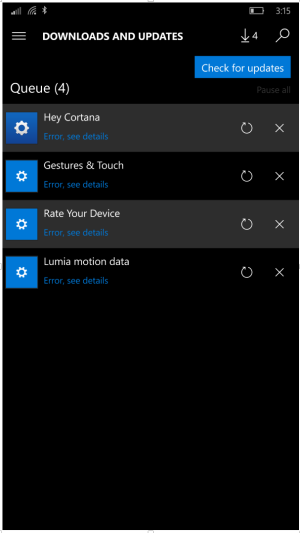
hey guys, these apps are giving me trouble updating. they want to be installed into the phones memory instead of my sd card, but refuses to do so even if I eject my card. anyone know a trick around this? phone is lumia 1520 att with latest preview build
Screenshot (4).png
 
Change your new app memory location to internal. Look under settings then storage, scroll down. You will be all good.
 
Go into storage and tap on sd card scroll down to the app that needs moving and tap that app, it gives you the option to move to device. Then once it is moved check for updates again and they should go.
 
Go into storage and tap on sd card scroll down to the app that needs moving and tap that app, it gives you the option to move to device. Then once it is moved check for updates again and they should go.

Nah doesn't work, even after a soft reset or removing the SD completely
 
Well, that's odd. I have a 1520 too and changing storage was the way to go. Then, since you removed the SD, just uninstall and reinstall the app.
 
I found the problem guys :)

these apps were installed on my sd card from earlier versions before the update, this update made it mandatory for these apps to be installed on the device instead, so when it tried to "update" the apps on the device, there weren't there to be updated. I had to go into the storage settings and move the apps from my sd to internal storage, and now they are updated!

thanks guys!
 
Last edited:

Forum statistics

Threads
342,696
Messages
2,265,774
Members
428,875
Latest member
Reneed
