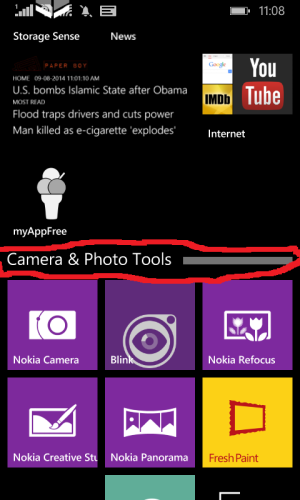
Can't make Live Folder On 630

Nazmus Tushar

New member
Aug 4, 2014
1
0
0
I updated my Lumia 630 to Windows Phone 8.1 update 1 but the live folder option is still disabled.
Plz help me.Do i need to do anything else to have that live folder option??
And another problem is in call mode i can't reduce the volume and the phone vibrates only once when i get a call.
please help me.
Thanks
Tushar(Bangladesh)
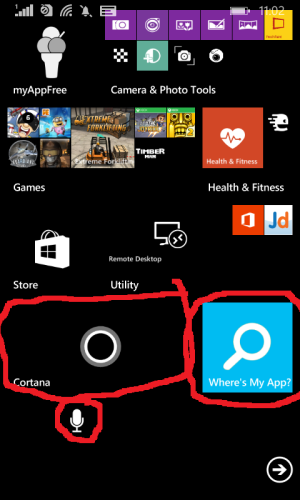
 
step by step
1.pin an app to the homescreen
2.as you know there are three sizes for tiles make the tile either medium or large
3.if it is small size you wont be able to drag and drop (difficulty)
4.now pin another app you want to include in the folder (make the live tile smaller)
5.drag the second tile over the first one and hold it for about <1s, it will fall in.
6.for renaming the folder you can press the band that appears
7.for every action you have to long press

wp_ss_20140809_0001.pngwp_ss_20140809_0002.png
 
Last edited:
how is/are your experience with Lumia 630 on dev preview update 1? any problem? or all good? pls share
 
how is/are your experience with Lumia 630 on dev preview update 1? any problem? or all good? pls share

No problems/bugs at all.
Cortana is not fully functional at the moment as it is in the alpha stage.
That will improve in the coming months as they release the updates for the non dev prev ones.
I found that the live folder thing is highly useful. My phone is more organized now :)
Sorted.
Having 100's of apps and having to find them individually is literally pain(even if you can search it )
A folder structure was highly needed :)
 
when official update 1 released, do we need to revert from dev preview to official 81 before update again to official update 1?
 
Hi,

I probably stupid right now but...

5.drag the second tile over the first one and hold it for about <1s, it will fall in.

This doesn't work for me. As before the Cyan update, holding a tile over another make the bottom tile move away. Classic tile reorganization. But how do I then make a live folder. Seem like the same drag'n'drop method to me...

/biggis
 
Hi,

I probably stupid right now but...

5.drag the second tile over the first one and hold it for about <1s, it will fall in.

This doesn't work for me. As before the Cyan update, holding a tile over another make the bottom tile move away. Classic tile reorganization. But how do I then make a live folder. Seem like the same drag'n'drop method to me...

/biggis

You have to be in DP version for live folder !
 
I thought the 630 came with 8.1 and Cyan out of the box?
Sent from my Lumia Icon using Tapatalk.
 
They said sometime in Q4, that technically is starting October till late December this year. It would be bundled with the Denim firmware update
 

Forum statistics

Threads
342,199
Messages
2,265,277
Members
428,859
Latest member
Menacer95