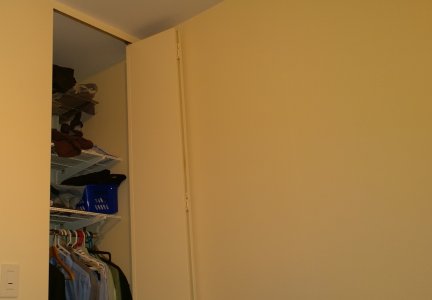
White Balance after Black update - fail on yellow flash effect

John20212

New member
Feb 27, 2012
565
0
0
So I finally updated to Black today and to my surprise the damn yellow tint is still present when using flash indoors.

I did one shot before the update with Nokia Pro Cam, and on after the Black update and after updating to Nokia Camera.
They look nearly identical.

before black
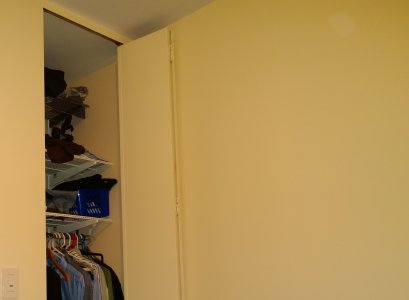
before black crop.jpg

after black
after black crop.jpg

no flash after black [this looks most like the real thing]
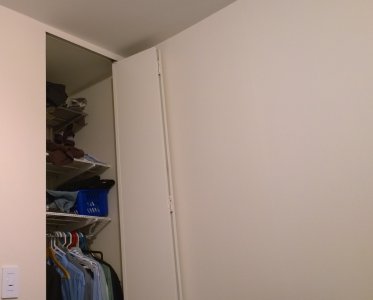
2after black no flash.jpg

Anyone else notice similar issue with the yellow tint not being fixed after updating to Black?


edit: Also forgot to mention, all setting were on auto, on the top two shots, on the no flash one, change from auto flash to no flash.
 
Black update fixed the yellow tint and also improved no flash low light images to a great extent on my Lumia. I don't have examples handy but I would say on a percentage scale pics are 40% better, still not perfect but visibly more accurate. Try some manual settings?
 
Black update fixed the yellow tint and also improved no flash low light images to a great extent on my Lumia. I don't have examples handy but I would say on a percentage scale pics are 40% better, still not perfect but visibly more accurate. Try some manual settings?

Yeah sure playing around with the setting I can get a lot better shot, but I posted this to show the comparison between the shots when left on full auto, as based on what others said I was expecting it to not have such a pronounced yellow tint after the Black Update.
 
That is disappointing to hear. That is my biggest issue with my 928. I expected better from the camera. Sure I can manually adjust the settings but I shouldn't have to do that to get an accurate shot. I hope I get better results when the update comes to the 928.
 
Keep ISO to 200 and all other settings to AUTO. Works great for me, no yellow tint with flash!
 
The best fix for yellow tint is to use crop edit app and use auto fix in it...and vola your snap is perfect. Try it
 
Don't think he's referring to an app per se - just look at the photo in your camera roll and choose the 'crop/edit/rotate' option or whatever it is called. I'm guessing it's that.
 
Don't think he's referring to an app per se - just look at the photo in your camera roll and choose the 'crop/edit/rotate' option or whatever it is called. I'm guessing it's that.

ah okay. With all the Nokia apps I completely forgot about the built in features. That does seem to fix it too. Just tried with mine.
 
Are you using Nokia Camera Beta? If not, try it.

What is the benefit of using Beta on the 1020 ?, I had both Beta and official Nokia Camera and other than a slight difference in shutter speed -
I couldn't see any difference between the jpegs and using Olympus Viewer 3 software with all the data that no one cares about like Meaning of each component: YCbCr, GAMA, DPI even with the Histogram laid side by side it was impossible to see a difference between Beta and Official
in the photos, they were the same except for shutter speed, and I'm taking about 1/12s sec vs 1/11s
Beta is made for non PureView cameras and acts according their OS so why use it when the 1020 has the official Nokia Camera ?
Maybe I'm missing something which is entirely possible so please let me know why Beta instead of Official ?
 
Nokia Camera Beta includes the smart sequence function from the Nokia Smart Cam. Looks like Nokia is working to combine the features of Nokia Smart Cam with Nokia Camera Beta.
 
What is the benefit of using Beta on the 1020 ?, I had both Beta and official Nokia Camera and other than a slight difference in shutter speed -
I couldn't see any difference between the jpegs and using Olympus Viewer 3 software with all the data that no one cares about like Meaning of each component: YCbCr, GAMA, DPI even with the Histogram laid side by side it was impossible to see a difference between Beta and Official
in the photos, they were the same except for shutter speed, and I'm taking about 1/12s sec vs 1/11s
Beta is made for non PureView cameras and acts according their OS so why use it when the 1020 has the official Nokia Camera ?
Maybe I'm missing something which is entirely possible so please let me know why Beta instead of Official ?

I took back to back images of the same exact shot, using both Apps, and the beta had a much cooler tone. Midday, well lit, indoor shots.


I didn't try a flash
 
I took back to back images of the same exact shot, using both Apps, and the beta had a much cooler tone. Midday, well lit, indoor shots.


I didn't try a flash

I can't see any difference and Olympus Viewer 3 RGB Histogram shows 0 difference.

Could you please post those two pictures ( or two different/but exact same scene)
with a screen shots of the "picture info" ? -if you wouldn't mind. :smile:
 
I can't see any difference and Olympus Viewer 3 RGB Histogram shows 0 difference.

Could you please post those two pictures ( or two different/but exact same scene)
with a screen shots of the "picture info" ? -if you wouldn't mind. :smile:

not those 2, I had no plan on sharing them. Just a bunch of paperwork.

I could take more, but if you don't get the same difference, why bother?
 
I also have the same problem. Pictures are very nice and sharp right after you take it and then the post processing destroys the picture after 2 seconds. It became yellowish. If you tried to use the front camera, see how you will look like a simpson.
 
With the Black update, a lot of the saturation can be solved with the Auto-Fix feature. Not all, but some, especially for those indoor flash photos.
 

Members online

No members online now.

Forum statistics

Threads
341,287
Messages
2,264,354
Members
428,833
Latest member
packwised