I couldn't remember the exact steps on this one, so the following is from ChatGTP. If you still can't get it to work, paste your question into that app and it can also analyze your dump file if uploaded.
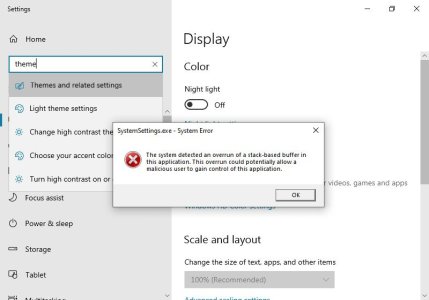
A system overrun of a stack-based buffer in SystemSettings.exe is almost always caused by corrupted theme files, shell extensions, or third-party customization software hooking into the “Themes” control panel.
The crash when opening Settings → Personalization → Themes is a common symptom.
Below is a safe, step-by-step repair path, starting with the simplest fixes and moving toward deeper repairs.
---

1. Remove/Reset Custom Themes
Corrupted .theme or .msstyles files can crash the Themes panel.
A. Delete all custom themes
1. Press Win + R
2. Run:
%localappdata%\Microsoft\Windows\Themes
3. Delete anything inside “Themes” except the CachedFiles folder.
B. Reset the theme back to default via command
Press Win + R, then run:
control /name Microsoft.Personalization /page pageColorization
If that still crashes, apply the default theme using PowerShell:
Get-ItemProperty -Path HKCU:\Software\Microsoft\Windows\CurrentVersion\Themes | Select-Object *
Then reset:
rundll32.exe themecpl.dll,OpenThemes
If it opens, select Windows (Light) or Windows (Dark).
---
2. Remove Conflicting Shell Extensions
This includes apps like:
StartAllBack / Start11
ExplorerPatcher
UltraUXThemePatcher
OldNewExplorer
Wallpaper Engine
Rainmeter skins using theme hooks
If you use any of these, uninstall them temporarily and reboot.
---
3. Check for Corrupt System Files
Open Command Prompt (Admin):
SFC Scan
sfc /scannow
DISM Repairs
DISM /Online /Cleanup-Image /RestoreHealth
Reboot afterward.
---
4. Clear Windows Theme Cache
Run:
%AppData%\Microsoft\Windows\Themes
Delete:
slideshow.ini
TranscodedWallpaper
Cached thumbnails
(Windows regenerates them automatically.)
---
5. Delete Corrupted Registry Keys for Themes
Warning: Only touch these keys (safe to delete). They rebuild at reboot.
Open Regedit → Delete these folders:
HKEY_CURRENT_USER\Software\Microsoft\Windows\CurrentVersion\Themes
HKEY_LOCAL_MACHINE\SOFTWARE\Microsoft\Windows\CurrentVersion\Themes
Reboot.
---
6. Disable GPU Acceleration in Settings App
Sometimes SystemSettings.exe crashes when a GPU driver update conflicts.
Try:
1. Go to Settings → System → Display → Graphics
2. Find SystemSettings.exe (you may need to browse at C:\Windows\System32\SystemSettings.exe)
3. Set it to Power saving (iGPU)
4. Reboot.
---
7. Check Recent Windows Updates
A bad update can break the theme UI.
Go to: Settings → Windows Update → Update history → Uninstall updates
Uninstall the most recent Optional/Preview update and reboot.
---
8. Create a New Local User Profile (Test Only)
If Themes works in a new profile, your user profile is corrupted.
Run:
net user TestUser TestPassword /add
Log in and test.
If it works, your original profile may need:
registry cleanup
profile rebuild
transferring files to a new profile
---
9. Last Resort – Repair Install (Keeps All Files)
If nothing else fixes it:
Download Microsoft’s Media Creation Tool → choose:
Upgrade this PC now → Keep apps and files
This replaces Windows system files without wiping your PC.
.





 Facebook
 Twitter
 Instagram