Windows 10 Themes no longer working...

DocCovington

New member
Dec 5, 2025
3
0
1
Hello, fellow Windows 10 users,

I hope someone here can help me out:
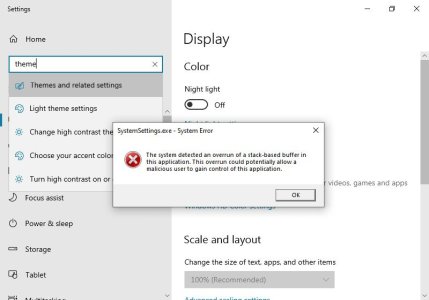
  • My Windows Themes suddenly stopped working. I can select all other categories under "Personalize", but clicking on "Themes" results in the application crashing (i.e., the window closing) and a SystemSettings.exe dump file being created.
Upon booting into Safe Mode, I got a direct error message that I screenshot:
themes-broken.jpg
How can I easily fix this without resorting to unwanted measures such as a system restore or having to create a brandnew user profile?

Thanks in advance. <3
 
I couldn't remember the exact steps on this one, so the following is from ChatGTP. If you still can't get it to work, paste your question into that app and it can also analyze your dump file if uploaded.

A system overrun of a stack-based buffer in SystemSettings.exe is almost always caused by corrupted theme files, shell extensions, or third-party customization software hooking into the “Themes” control panel.
The crash when opening Settings → Personalization → Themes is a common symptom.

Below is a safe, step-by-step repair path, starting with the simplest fixes and moving toward deeper repairs.


---

✅ 1. Remove/Reset Custom Themes

Corrupted .theme or .msstyles files can crash the Themes panel.

A. Delete all custom themes

1. Press Win + R


2. Run:


%localappdata%\Microsoft\Windows\Themes

3. Delete anything inside “Themes” except the CachedFiles folder.


B. Reset the theme back to default via command

Press Win + R, then run:

control /name Microsoft.Personalization /page pageColorization

If that still crashes, apply the default theme using PowerShell:

Get-ItemProperty -Path HKCU:\Software\Microsoft\Windows\CurrentVersion\Themes | Select-Object *

Then reset:

rundll32.exe themecpl.dll,OpenThemes

If it opens, select Windows (Light) or Windows (Dark).


---

✅ 2. Remove Conflicting Shell Extensions

This includes apps like:

StartAllBack / Start11

ExplorerPatcher

UltraUXThemePatcher

OldNewExplorer

Wallpaper Engine

Rainmeter skins using theme hooks


If you use any of these, uninstall them temporarily and reboot.


---

✅ 3. Check for Corrupt System Files

Open Command Prompt (Admin):

SFC Scan

sfc /scannow

DISM Repairs

DISM /Online /Cleanup-Image /RestoreHealth

Reboot afterward.


---

✅ 4. Clear Windows Theme Cache

Run:

%AppData%\Microsoft\Windows\Themes

Delete:

slideshow.ini

TranscodedWallpaper

Cached thumbnails


(Windows regenerates them automatically.)


---

✅ 5. Delete Corrupted Registry Keys for Themes

Warning: Only touch these keys (safe to delete). They rebuild at reboot.

Open Regedit → Delete these folders:

HKEY_CURRENT_USER\Software\Microsoft\Windows\CurrentVersion\Themes

HKEY_LOCAL_MACHINE\SOFTWARE\Microsoft\Windows\CurrentVersion\Themes

Reboot.


---

✅ 6. Disable GPU Acceleration in Settings App

Sometimes SystemSettings.exe crashes when a GPU driver update conflicts.

Try:

1. Go to Settings → System → Display → Graphics


2. Find SystemSettings.exe (you may need to browse at C:\Windows\System32\SystemSettings.exe)


3. Set it to Power saving (iGPU)


4. Reboot.


---

✅ 7. Check Recent Windows Updates

A bad update can break the theme UI.

Go to: Settings → Windows Update → Update history → Uninstall updates

Uninstall the most recent Optional/Preview update and reboot.


---

✅ 8. Create a New Local User Profile (Test Only)

If Themes works in a new profile, your user profile is corrupted.

Run:

net user TestUser TestPassword /add

Log in and test.

If it works, your original profile may need:

registry cleanup

profile rebuild

transferring files to a new profile


---

✅ 9. Last Resort – Repair Install (Keeps All Files)

If nothing else fixes it:

Download Microsoft’s Media Creation Tool → choose:

Upgrade this PC now → Keep apps and files

This replaces Windows system files without wiping your PC.

.

 
  • Like
Reactions: DocCovington
Hey! :)

First off, thank you for taking the time to type such a detailed response. Highly appreciated!

> Delete all custom themes
>
Clear Windows Theme Cache
I had done that before I posted my problem.

> sfc /scannow
>
DISM /Online /Cleanup-Image /RestoreHealth
Had done that, too, before posting here. Sadly, to no avail. No corrupted system files were found. I am starting to believe that the issue is related to the latest Win10 preview update.

> Registry Cleaning
Yep, had done that as well. :D

> control /name Microsoft.Personalization /page pageColorization
This directs me to Personalize -> Background instead of Personalize -> Themes. I do not have any issues with any of the tabs (including "Colors") except Themes, which crashes the Settings when I click on it.

> rundll32.exe themecpl.dll,OpenThemes
This produced the following error: "Error in themecpl.dll | Missing entry: OpenThemes"

> Remove Conflicting Shell Extensions
I use none.

> Delete Corrupted Registry Keys for Themes
Didn't help. :(

> Disable GPU Acceleration in Settings App
I could not find Settings → System → Display → Graphics. There is no "Graphics" section under "Display" in my Win10 Professional installation. I have:
  • Rearrange your display
  • Color
  • Windows HD Color
  • Scale and layout
  • Multiple displays
  • Advanced didplay settings
  • Graphics settings (with the two categories "Hardware-accelerated GPU scheduling" and "Graphics performance preference")
> Create a New Local User Profile
This command does nothing on my PC when I enter it in Run. For a split second, a command window popped up, but nothing happened. No test user was created.

> Last Resort – Repair Install (Keeps All Files)
Oof... I think I will wait for the full Win10 December Update, maybe M$ will fix the issue. I am not keen on screwing with my current installation, to be honest, after noticing that my old Acronis True Image 2015 is no longer working properly with my current version of Windows. The last back-up I have created with it can no longer be restored. Great! ^^
 
P.S. This is what the debugging tool is telling me about the .dmp file:
_________________________________

DEBUG_FLR_EXCEPTION_CODE(80070006) and the ".exr -1" ExceptionCode(c0000409) don't match

CONTEXT: (.ecxr)
rax=000000a2f7bf7af0 rbx=000000a2f7bf8070 rcx=000000a2f7bf7af0
rdx=0000000000000000 rsi=000000a2f7bf8070 rdi=000000a2f7bf7af0
rip=00007ff9be031ecf rsp=000000a2f7bf79d0 rbp=0000000000000001
r8=0000000000000000 r9=0000000000000000 r10=00000fff377b57d9
r11=0000000002000002 r12=000001a6ddcb0c68 r13=0000000000000000
r14=0000000000000000 r15=0000000000000000
iopl=0 nv up ei pl nz na pe nc
cs=0033 ss=002b ds=002b es=002b fs=0053 gs=002b efl=00000200
ntdll!RtlRaiseNoncontinuableException+0xf:
00007ff9`be031ecf 488b542428 mov rdx,qword ptr [rsp+28h] ss:000000a2`f7bf79f8=000000a2f7bf8070
Resetting default scope

EXCEPTION_RECORD: (.exr -1)
ExceptionAddress: 00007ff968603cb5 (SettingsHandlers_nt!SystemSettings:: Personalization::ThemeHelper::OnSingletonDeinit+0x0000000000000195)
ExceptionCode: c0000409 (Security check failure or stack buffer overrun)
ExceptionFlags: 00000001
NumberParameters: 3
Parameter[0]: 0000000000000007
Parameter[1]: ffffffff80070006
Parameter[2]: 0000000000000921
Subcode: 0x7 FAST_FAIL_FATAL_APP_EXIT

[---cutting the STACK-TEXT---]

PROCESS_NAME: SystemSettings.exe

EXCEPTION_CODE_STR: 80070006

SYMBOL_NAME: SettingsHandlers_nt!SystemSettings:: Personalization::ThemeHelper::OnSingletonDeinit+195

MODULE_NAME: SettingsHandlers_nt

IMAGE_NAME: SettingsHandlers_nt.dll

STACK_COMMAND: ~3s ; .ecxr ; kb

FAILURE_BUCKET_ID: FAIL_FAST_FATAL_APP_EXIT_80070006_SettingsHandlers_nt.dll!SystemSettings:: Personalization::ThemeHelper::OnSingletonDeinit

OS_VERSION: 10.0.19041.1

BUILDLAB_STR: vb_release

OSPLATFORM_TYPE: x64

OSNAME: Windows 10

FAILURE_ID_HASH: {57a28dd6-159e-a8a2-33c8-b620da57293d}

0:003> lmvm SettingsHandlers_nt
start | end | module name
00007ff9`684d0000 00007ff9`6884e000 SettingsHandlers_nt (pdb symbols) C:\Program Files\Windows Kits\10\Debuggers\x64\sym\SettingsHandlers_nt.pdb\10946EF8F121454E7A60DCFC5A3545DF1\SettingsHandlers_nt.pdb
Loaded symbol image file: SettingsHandlers_nt.dll
Mapped memory image file: C:\Program Files\Windows Kits\10\Debuggers\x64\sym\SettingsHandlers_nt.dll\85C7203537e000\SettingsHandlers_nt.dll
Image path: C:\Windows\System32\SettingsHandlers_nt.dll
Image name: SettingsHandlers_nt.dll
Browse all global symbols | functions | data
Image was built with /Brepro flag.
Timestamp: 85C72035 (This is a reproducible build file hash, not a timestamp)
CheckSum: 0036CD97
ImageSize: 0037E000
File version: 10.0.19041.6280
Product version: 10.0.19041.6280
File flags: 0 (Mask 3F)
File OS: 40004 NT Win32
File type: 2.0 Dll
File date: 00000000.00000000
Translations: 0409.04b0
Information from resource tables:
CompanyName: Microsoft Corporation
ProductName: Microsoft® Windows® Operating System
InternalName: SettingsHandlers_nt.dll
OriginalFilename: SettingsHandlers_nt.dll
ProductVersion: 10.0.19041.6280
FileVersion: 10.0.19041.6280 (WinBuild.160101.0800)
FileDescription: System Settings Handlers Implementation
LegalCopyright: © Microsoft Corporation. All rights reserved.
 

Trending Posts

Members online

Forum statistics

Threads
341,687
Messages
2,264,762
Members
428,839
Latest member
udidwht