950 not recognised by windows 10 laptop, yellow triangle in device manager.

Rosebank

New member
Oct 6, 2016
445
0
0
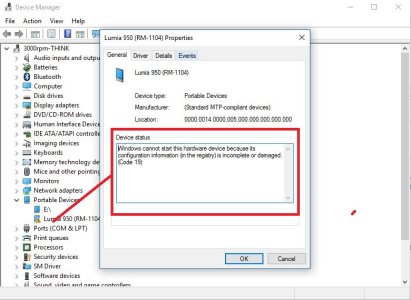
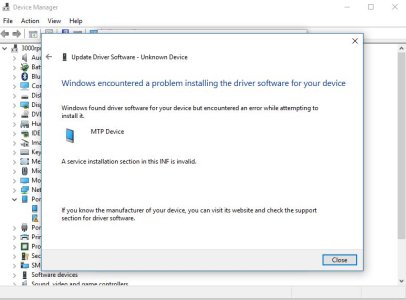
As above, try to update driver and it says encountered a problem, Weird thing is on my old T61 running 10 it works fine, windows phone seen in file explorer and device manager but on my T430 it does not allow the device to be used, it can see the device in device manager but yellow triangle with exclamation mark on it. Any ides please. Photos to follow...
 
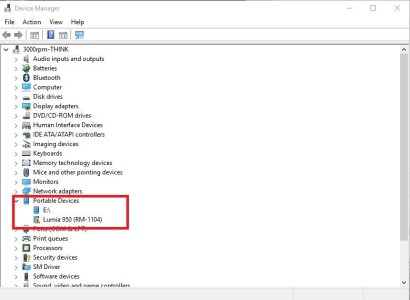
Device manager before i insert the 950 with USB cable, Tried USB 3.0 and USB 2.0 ports, both do the same thing.

wp1.JPG
 
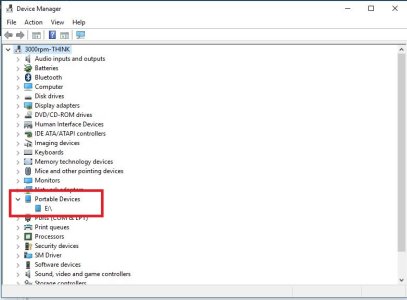
Finally in device manager after all of the above the Lumia icon appears differently.

wp5.JPG
 
Thanks for the link but the issue still persists, tried everything, restarts etc, I did remove the sd card and it made no difference, windows 10 laptop and windows 10 mobile and the 2 cant connect? WTH?
 
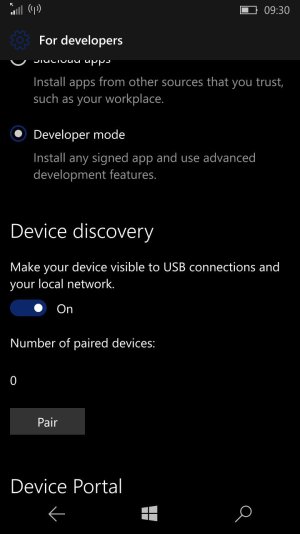
I found this setting in the phone to and it makes no difference either even after restarts etc.

wp_ss_20161012_0001.jpg
 
Could someone send me a driver that works, I can then add it via device manager. The online search finds a driver but fails to install it as above. ^^
 
Thanks for the link but the issue still persists, tried everything, restarts etc, I did remove the sd card and it made no difference, windows 10 laptop and windows 10 mobile and the 2 cant connect? WTH?

On my old Lenovo laptop I encounter the following situation:
Laptop on W10 (32bit) with 4 USB2.0 ports. 3 ports are grouped next to one another, and 4th is on the opposite side of the laptop. If I connect my L950 to the 4th port, nothing happens, but everything works fine on 3 other ports.
I use the 4th port regularly with my other phones without problems, including Lumia 830 on the same (public) version of W10M as my Lumia 950...

Btw, what version of W10 are you using; 32 or 64bit?
 
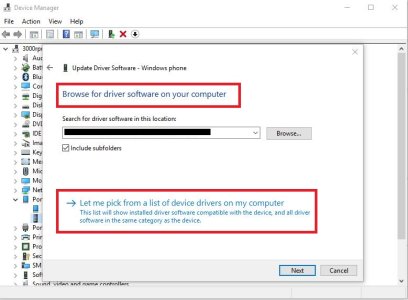
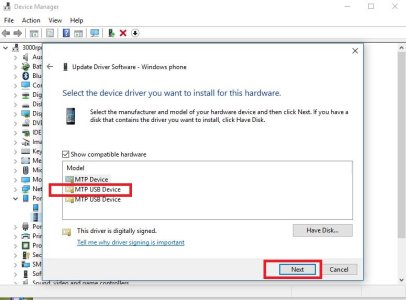
Solved**, I had to manually install the MTP driver files, all ports both 2.0 and 3.0 now work, and on the T61 and T430, also an interesting find was that the computer cant access the phone when screen/phone locked, a nice security feature, no traffic from laptop to phone possible, All good now, thank god. Today I have read horror stories about people resetting their entire laptop to fix this issue, no way was I doing that! Took a while but I got there in the end.

Right click phone in device manager (yellow exclamation warning)
update driver, select from PC
Then select from Drivers on PC, select MTP driver, boom all good, Files can only be transferred when mobile is UNLOCKED!
wp6.JPG
wp7.JPG
 
Last edited:
This worked for me on my updated Windows 10 Pro desktop and up-to-date Lumia 950 XL in 2017. A Windows 10 Mobile device on Windows 10 desktop in 2017 requiring the device manager to work is stupid. This is where the phone should work PERFECTLY. Really disappointed this doesn't just work...
 
Its really sad that it can take this type of error/mismatch of devices of the same brand. really sad.
 

Trending Posts

Forum statistics

Threads
341,926
Messages
2,265,004
Members
428,849
Latest member
minale