DNG vs 5mp JPG vs Screenshot

petedgr8

New member
Dec 19, 2013
3
0
0
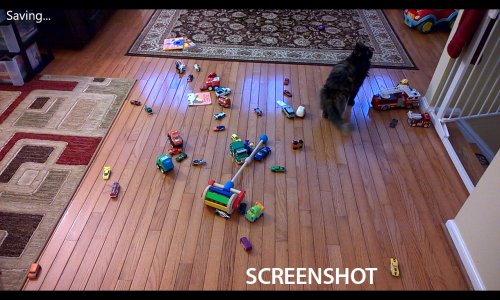
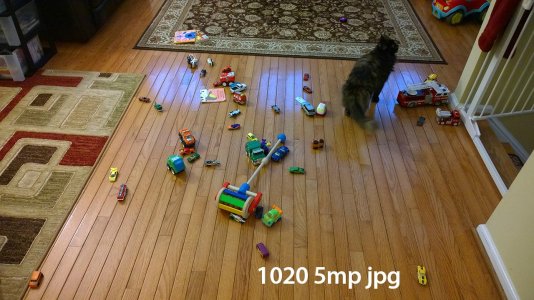
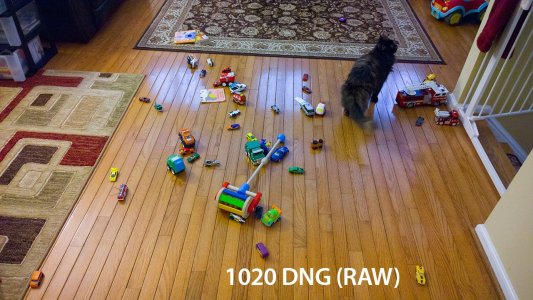
As everyone is aware, our 1020s do a crappy job of jpg processing. You take a picture and it looks great, but then the 1020 does all this post processing and you're left with a green/yellow fuzzy image. So you thought, ok, the Black update should fix this, right? Yes and no. The DNG untouched looks MUCH better and is probably the source you should be using, but it still doesn't look quite like the screenshot, which is fine I think. But you also have to contend with a massive file size... the one here was 43mbs.

I took 3 versions of the same photo. The screenshot, the 5mp jpg, and the DNG, and resized them all to the same size as the screenshot. I know, in doing this, I'm processing the image myself. This is just to show how different the screen looks from the image files it creates. Hope this helps folks (or makes you more frustrated).
EiYHkMV.jpgCkjIrtH.jpgG1vXSKi.jpg
 

Attachments

  • 1020-screenshot.jpg
    1020-screenshot.jpg
    371.5 KB · Views: 20
Hm, thanks for that comparison, but I think more scenes will be needed. Maybe I'll try my own when I get a moment, but I'm noticing a definite improvement on my device. Looking at your screenshots though, I might be more inclined to say that your screenshot has a slight blueish tint. Which image looks closest to the actual scene? It's tough to determine which image is best without seeing a reference image that is the accurate depiction (which I guess would require a very good SLR or something).

By the way, what are you using for the DNG processing?
 
Colors seem so much better on raw pic.
They are right and there is really less noise now.
 
Hmmm... this is interesting, but I can argue that the screen profile setting is also messing with your screenshot, don't you think?

Yet again, is RAW effected by the Nokia Camera app manual settings? meaning, if you choose the wrong environment setting, you will end up with a bad pic, right? or does it disregard those settings?
 
Hm, thanks for that comparison, but I think more scenes will be needed. Maybe I'll try my own when I get a moment, but I'm noticing a definite improvement on my device. Looking at your screenshots though, I might be more inclined to say that your screenshot has a slight blueish tint. Which image looks closest to the actual scene? It's tough to determine which image is best without seeing a reference image that is the accurate depiction (which I guess would require a very good SLR or something).

By the way, what are you using for the DNG processing?

The closest image (to my eye) is the RAW. The JPG has a greenish tint, and the screen image is magenta/blue. I do have a very good SLR but I missed the window to take the shot as a comparison (same lighting, same toys strewn about). But a good idea for the next comparison post.

I imported the raw straight into CS6.
 
Hmmm... this is interesting, but I can argue that the screen profile setting is also messing with your screenshot, don't you think?

Yet again, is RAW effected by the Nokia Camera app manual settings? meaning, if you choose the wrong environment setting, you will end up with a bad pic, right? or does it disregard those settings?

Depends on what setting you change - as I understand it, the raw file is the raw data from the image sensor. If you change shutter speed, ISO, focus, etc, you're going to change what the image sensor sees. Exposure compensation and white balance, as I understand it, can be more easily modified after the image is taken, and a raw file, with it's raw data, will allow you to make post-processed changes to these, but I believe your settings at the time of the photo will be stored in the raw file.

Best way to think of it is in terms of old photography - if you take a picture and it goes to film, the film is the negatives that need to get developed. These negatives are equivalent to the Digital Negative (DNG) file. They store the data and will look roughly similar to the image taken if looked at with no modifications. However, in order to really get a good picture out of them, you want to process them properly by adjusting the exposure levels and converting it to a solid state form, on paper from the film, or to a JPG/PNG/etc from DNG.

I am not a professional photographer and this is just my simpler understanding of things. Hopefully someone can go more into detail (and correct anything I said incorrectly).
 
The closest image (to my eye) is the RAW. The JPG has a greenish tint, and the screen image is magenta/blue. I do have a very good SLR but I missed the window to take the shot as a comparison (same lighting, same toys strewn about). But a good idea for the next comparison post.

I imported the raw straight into CS6.

Great thanks for the follow-up! Looking at the images on their own almost makes you say that it looks like the raw is yellow and the jpg is natural, but hearing what you see as closest helps understand what it should look like. Would definitely be interested in seeing your comparisons with the SLR though. Thanks also for the details on what software you used. I downloaded LightZone (free "alternative" to Lightroom), but it really isn't that great.
 
Depends on what setting you change - as I understand it, the raw file is the raw data from the image sensor. If you change shutter speed, ISO, focus, etc, you're going to change what the image sensor sees. Exposure compensation and white balance, as I understand it, can be more easily modified after the image is taken, and a raw file, with it's raw data, will allow you to make post-processed changes to these, but I believe your settings at the time of the photo will be stored in the raw file.

Best way to think of it is in terms of old photography - if you take a picture and it goes to film, the film is the negatives that need to get developed. These negatives are equivalent to the Digital Negative (DNG) file. They store the data and will look roughly similar to the image taken if looked at with no modifications. However, in order to really get a good picture out of them, you want to process them properly by adjusting the exposure levels and converting it to a solid state form, on paper from the film, or to a JPG/PNG/etc from DNG.

I am not a professional photographer and this is just my simpler understanding of things. Hopefully someone can go more into detail (and correct anything I said incorrectly).

Damn straight. RAW files are often preferred by photographers because of the effectiveness of any changes (usually white and colour balance) done in post-processing software like Photoshop - and yes you can revert back to the original image
 
Hmmm... this is interesting, but I can argue that the screen profile setting is also messing with your screenshot, don't you think?

Yet again, is RAW effected by the Nokia Camera app manual settings? meaning, if you choose the wrong environment setting, you will end up with a bad pic, right? or does it disregard those settings?

His screen configuration settings are irrelevant, the screen shot is on the OS level. You could remove the screen and it would still take a screen shot. Again, screen shot is at the OS level, the screen itself is completely irrelevant.
 
How many MP does the DNG have? Coz i also setup mine to 5MP jpeg + 34 MP DNG (I'm on 16:9), but the DNG is only 3864x2176 (8,41 MP), at least thats what FS ImageViewer tells me...
 
That is really strange that the yellow haze still exists in a RAW format where typically no post processing is present. Besides the fact, at least it improves the color and overall quality of the image.
 
See, the thing is, no one knows what is actually "more accurate" here besides the person who was taking the shot. Perhaps the scene wasn't actually "neutral", ya know? We just can't know.
 
Uhm, the screenshot is obviously a processed image as you clearly can't display the raw image in the viewfinder,and given the fact that it is shown before the image is saved, it clearly involves a lower resolution and faster processing. There is nothing that implies that the viewfinder is the most accurate portrayal of the scene...
 
Screenshot:
TxRLbR1l.png

RAW Processed:
x8JXDPPl.jpg
 

Members online

Forum statistics

Threads
341,344
Messages
2,264,412
Members
428,833
Latest member
siacuz