Take RAW pictures to really show off your Icon

Yes I do. It uses DNG as its RAW capture file format. I then can download and process in either Photoshop or Lightroom. I can event process and edit on the phone using Rawer.

Again, how are you shooting raw? Cyan is required...which we obviously don't have. Only options I have is jpeg.
 
Again, how are you shooting raw? Cyan is required...which we obviously don't have. Only options I have is jpeg.

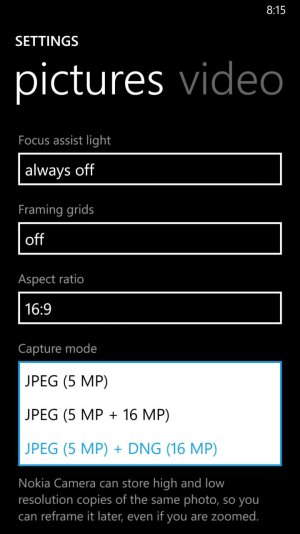
Um...that's not true at all?

I'm on stock 8 and can shoot with the DNG option, Lumia Camera Classic (aka Nokia Camera Beta). What app are you using?
 
Huh, that's weird.

Just took this -- WP8/GDR3/Black, Lumia Camera Classic:

d33d6bc40126290eb72bcbcb77243a37.png
 
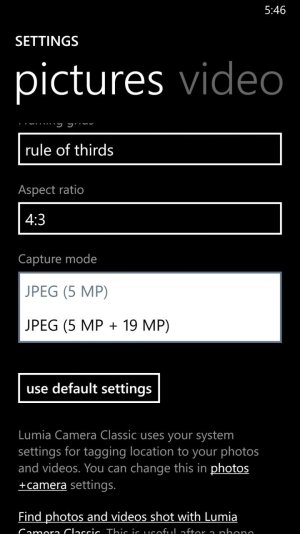
Nope, not an option on mine. I'm using 8.1 dp. Jpeg 5mp and Jpeg 5mp + 16mp. No dng option.
I would really like to see a screen capture of that settings screen from the Nokia camera app, i kind of remember the DNG option always being there...
 
I would really like to see a screen capture of that settings screen from the Nokia camera app, i kind of remember the DNG option always being there...


Nope.


Pro Cam didn't (doesn't) have it.


I can take that screenshot right now as well:


c3da95fa84b03d439611ed46972da09e.png


:)
 
Your phone hates you. Have you bought it flowers lately?

That is really weird -- and that is about as recent app version as you can get.
 
What version are you using? 8.6.0.254 is the latest version.

Edit: I just updated to 8.7.0.309. Keep in mind Adobe Camera Raw is not a stand alone app. It is a plugin that is used by Adobe products such as Photoshop, Illustrator, and Bridge; and is baked into Lightroom.

At the time (the day before my post) I downloaded the latest version they had. But I didn't know it wasn't a standalone app. I was hoping I didn't have shell out any money to look at my raw pictures.
 
You don't need a recent version for it to recognize the DNG files. In fact, I'm still using Adobe CS5.

Load up Adobe Bridge. Go to your DNG file. Right-click on the file and choose "open in camera raw". Your DNG file should load.

The reason why I recommend Camera Raw above the other options is for simplicity. With Camera Raw, all you need to know how to do is move sliders around. Anyone can move sliders. And the sliders are arranged in order of how you should edit the pictures. So you go from the top slider downward. Because all sliders affect the effects of the other sliders, they arranged the sliders in this sequence to reduce your random guessing.

I'll give that a try when i get home.
 
At the time (the day before my post) I downloaded the latest version they had. But I didn't know it wasn't a standalone app. I was hoping I didn't have shell out any money to look at my raw pictures.

Yeah. Like onlysublime said you can open it through Adobe Bridge and make adjustments. You can save the image directly from Adobe Camera RAW, but you still need Adobe Photoshop and Adobe Bridge installed because Adobe Camera RAW is a plugin is accessed by Photoshop, Bridge, etc. not an actual stand alone program.

There are also a plenty of free RAW editors out there too (just Google them); or you can get Photoshop Elements that also uses Adobe Camera RAW and is not as intimidating as Photoshop or Lightroom.
 

Trending Posts

Forum statistics

Threads
341,977
Messages
2,265,055
Members
428,854
Latest member
Tech Pulse